
AI Age Filter Online
Create an aged version of your photo with ai age filter online. Smart ai photo ager, realistic wrinkles and hair changes, fast preview, easy save.
Example result

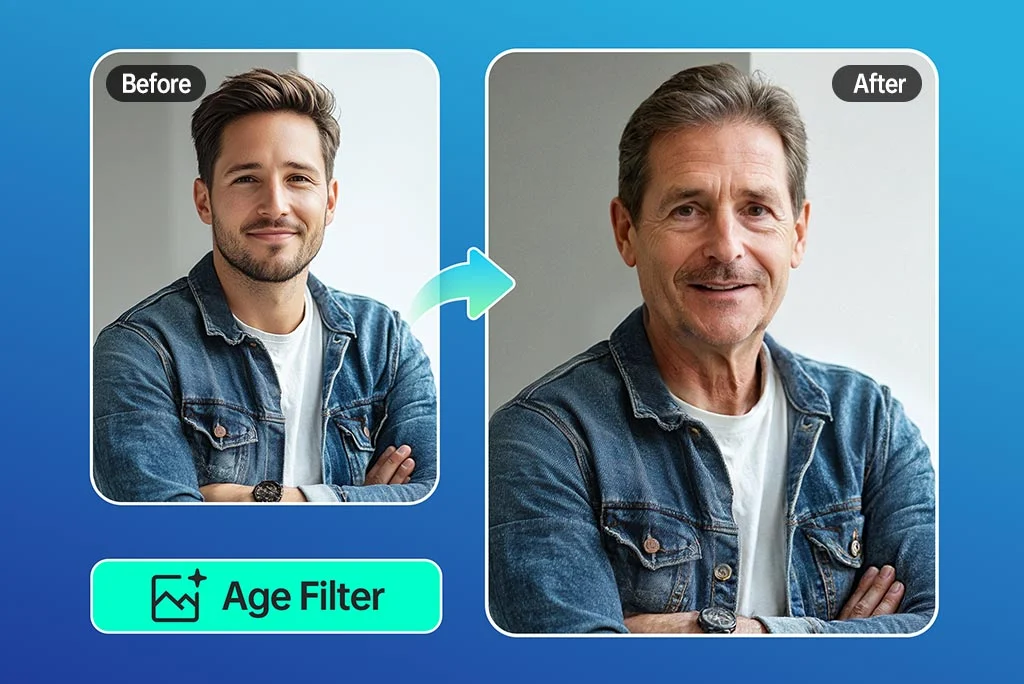
Drag the slider to compare before and after. Upload your photo to create your own version.
Tools you may like


What is AI Age Filter Online?
Meet ai age filter online: a browser-based tool that shows a believable older-you preview from a single photo. Upload a selfie, pick a target age, and the aging filter adjusts skin texture, hair tone, and facial contours in seconds. Use it as an old filter for fun, a consistent ai photo ager for character planning, or stack extra ai photo effects when you want a more stylized look. If you’re exploring an ai aging photo online free option, start with one clear image, then test a second shot to compare results. With ai age filter online, you can iterate quickly and save the ai age filter online version that feels most like you.
Instant preview
Drop in a photo and get a realistic aging filter result in moments—no installs. ai age filter online keeps the process simple from upload to download.
Natural older look
Dial in wrinkles, hair silvering, and skin tone with an old filter that still looks like you. ai age filter online blends details for believable ai photo effects.
One-tap free try
Try an ai aging photo online free pass to see the transformation before you export. ai age filter online makes it easy to compare ages side by side.
Share-ready output
Export clean images for posts, mockups, or memories. ai age filter online doubles as an ai photo ager when you need consistent results across a set.
AI Age Filter Online FAQs
Quick answers about ai age filter online, including setup tips, aging filter controls, and common questions about old filter results.
How does ai age filter online create an older face?
ai age filter online detects facial landmarks and then applies an aging filter that simulates changes like fine lines, texture shifts, and hair color changes. The aim is to keep your identity recognizable while adding age cues. For creative edits, you can add extra ai photo effects after the first pass.
Is ai age filter online free to use?
Many users begin with an ai aging photo online free flow: upload, apply the old filter, and preview the result. ai age filter online often provides basic previews at no cost, while higher-resolution downloads, extra presets, or batch processing may depend on the tool’s current limits.
Can I choose a specific age or age range?
Yes. With ai age filter online you can usually select an age slider or presets (for example, 40, 60, 80). This helps the aging filter stay controlled instead of guessing. If you need a consistent look across several images, treat it like an ai photo ager and reuse the same settings.
Will the results look realistic or cartoonish?
Realism depends on the input photo and how strongly you push the old filter. ai age filter online tends to look most natural with good lighting and a neutral expression. For a stylized look, increase ai photo effects; for subtle realism, keep the aging filter mild and let the ai photo ager preserve facial structure.
What kind of photos work best?
For ai age filter online, use a clear, front-facing photo with even light and minimal blur. A simple background helps the aging filter focus on facial details. If you’re testing an ai aging photo online free option, start with one high-quality selfie, then repeat with a second angle to confirm consistency.
Is my photo safe and private?
ai age filter online is built for quick edits, so it’s smart to avoid uploading sensitive images. After you generate ai photo effects, download what you need and remove uploads if the site offers a delete/clear option. For an ai aging photo online free test, use a non-sensitive selfie and review the provider’s privacy notes.
Can I use the aged image on social media or for a project?
Yes—people use ai age filter online results for memes, storytelling, and before/after posts. Be transparent when an old filter or other ai photo effects are used, especially in professional contexts. If you’re creating a series, the ai photo ager method (same settings, similar lighting) helps maintain continuity.