
Image to Image AI Generator
Try the all-in-one AI image workstation—an ai image editor ready out of the box with zero learning curve. Edit, enhance, restyle, and add effects in seconds. Start now!!

Homepage image generator
Image Generator
Integrates the most advanced AI image generation models, supporting text-to-image and image-to-image, and get diverse outputs by uploading reference images.
Credits for completed generation steps are not refunded, including results blocked by safety checks or affected by saving or display errors. Failed or unstarted steps are refunded; unconfirmed steps remain pending.
How to use Image to Image AI
Generate Image from Image in four simple steps
- 1
Pick a creation mode
Choose Text to Image for fully AI-made scenes, or Image to Image to upload a picture and transform it with new looks.
- 2
Select a model
Pick a model based on credits and quality; higher-cost options use more credits but deliver sharper, more detailed results.
- 3
Write your prompt
Describe what you want to generate or edit in a short prompt, including subject, style, colors, and overall mood.
- 4
Generate and share
Click Generate, wait a moment, then download your image and share it directly to your social channels or library.
What is Image to Image AI
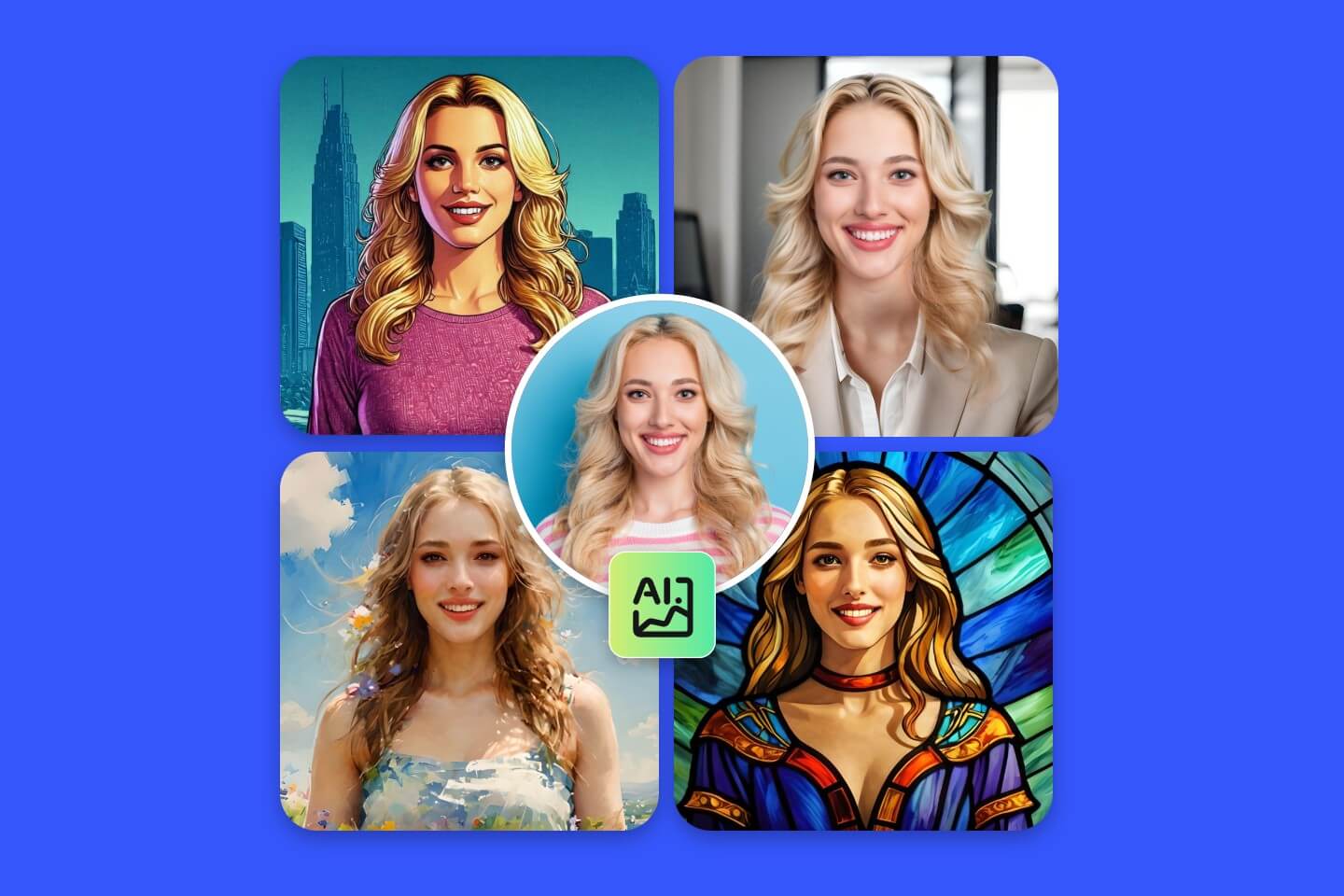
Image to image ai is a new way to transform photos using your own image as the foundation plus a simple text prompt. Unlike tools that generate visuals from scratch, it analyzes your uploaded photo—composition, lighting, and structure—and uses it as a blueprint to apply changes while keeping key elements consistent and natural. As an image to image ai generator, it delivers the ideal balance between preservation and creative transformation, letting you edit, restyle, and create multiple variations fast with zero Photoshop skills. Whether you’re a designer, marketer, or creator, it works as an ai image creator and ai image maker to produce polished, high-impact results with speed, control, and reliable consistency. Unlike other AI image editors, the Img2Img AI platform offers the following advantages:
10+ Elite Models in One img2img Workspace
Power your workflow with 10+ world-class models—nano banana pro, Seedream 4.0, Seedream 4.5, Flux, and more. A true image to image ai generator built for consistent results, perfect as an ai image editor and photo to photo ai toolkit.
20+ Ready-to-Use Tools, Zero Setup
One-click utilities like watermark remover, background remover, Photo Restoration, and Image Enhancer—everything you need in an ai image creator and ai image maker that works out of the box.
100+ Viral AI Photo Effects & Filters
Apply trending social effects and photo filters instantly—add filter to image in seconds. Includes prompt optimization to make every result cleaner, sharper, and more shareable.
Prompt Library + Tutorials for Real Growth
Explore curated prompt packs for nano banana, Flux, Seedream and more, plus hands-on guides and the latest AI imaging news—get inspiration and ship better creations faster.
Why Choose Img2Img AI (The Best Image to Image AI Generator)
Img2Img AI is a complete image to image ai workstation for fast, consistent, and controllable creation. As an image to image ai generator—an AI Image Generator from Image—it transforms your uploaded photo into high-quality variations using simple prompts. From img2img edits to creative restyles, this img to img ai platform helps you produce professional visuals in seconds.

Key Features of Image to Image AI Generator
Unlock creative control with image to image ai—a modern image to image ai generator and ai image editor that uses your photo as the anchor. This AI Image Generator from Image powers consistent img2img variations, letting any ai image creator or ai image maker transform visuals with speed and confidence.
Photo & Image Restyling (Smart Style Transfer)
Swap styles while keeping your original framing, lighting, and subject intact. This ai image to image generator delivers cohesive restyles—from film looks to illustrations—without losing identity.
Subject Editing (People & Product Control)
Make object-level edits with precision: remove distractions, replace props, adjust clothing, refine product details, and more. The img2img workflow lets you update key elements without rebuilding the entire scene.
Image Restoration & Enhancement
Bring old, blurry, or noisy photos back to life. Our photo to photo ai pipeline sharpens edges, recovers texture, reduces noise, and improves clarity—perfect for archival scans and everyday fixes.
Background Processing (Remove, Replace, Rebuild)
Remove backgrounds cleanly or generate new scenes that match your subject’s lighting and perspective. As an AI Image Generator from Image, it keeps your subject consistent while upgrading the setting.
Smart Outpainting (Intelligent Expand)
Extend images beyond the original frame to fit any ratio—social banners, posters, product layouts. This image to image ai generator fills missing areas naturally while preserving style continuity.
One-Click AI Effects & Filters
Apply trending ai photo effects instantly for social-ready results. Use prompt-guided styles or one-tap presets to create standout visuals—fast, cohesive, and shareable.
People Love Img2Img AI
for it's easy to use and produce professional results.
999+ Customers
999+Customers
20+ Fast Tools
20+Fast Tools
100+ AI Effects & Filters
100+AI Effects & Filters
What Users Say About Img2Img AI
Our image to image ai workflow turns one product photo into many options. The img2img tool keeps angles consistent and works as an ai image editor for quick cleanup.
David Chen, E-commerce Marketer
David Chen
E-commerce Marketer
When I need img to img ai styling, I use this image to image ai generator. The ai image to image generator gives several variations I can publish right away, and it doubles as an ai image creator for socials.
Rachel Kim, Content Creator
Rachel Kim
Content Creator
For mockups, image to image ai is the fastest path. I treat img2img as an ai image maker and ai image creator to iterate layouts without rebuilding assets.
Marcus Thompson, Product Designer
Marcus Thompson
Product Designer
This image to image ai generator is great for photo to photo ai mood changes. It preserves the subject while I restyle backgrounds and lighting.
Sofia Garcia, Photographer
Sofia Garcia
Photographer
We use image to image ai to test creatives quickly. It’s an ai image creator that keeps brand consistency across ads and landing pages.
James Wilson, Growth Lead
James Wilson
Growth Lead
I wanted an ai image editor that’s simple. Img2img makes image to image ai edits easy—an AI Image Generator from Image for non-designers.

Anna Zhang, Indie Founder
Anna Zhang
Indie Founder
Image to Image AI Generator FAQ
Have another question? Contact us by email.
What is image to image ai, and why is it useful for photo to photo ai edits?
Image to image ai transforms an existing picture using a text prompt while keeping the original image as a guide. It’s ideal when you want edits and variations without losing composition. Think of it as an AI Image Generator from Image that keeps structure while you direct the change.
How do I control results in an image to image ai generator?
Be specific about subject, style, lighting, and background, then tune transformation strength if available. A good image to image ai generator also supports multiple outputs so you can pick the best result. If you want an ai image editor feel, describe what must stay the same (pose, framing) and what should change.
What can an ai image to image generator do for marketing and design?
You can restyle photos, swap backgrounds, adjust colors, and create new concepts from a base shot. Many teams use it as an ai image maker, an ai image creator, and an ai image to image generator for ads, mockups, thumbnails, and social posts. It also fits photo to photo ai pipelines where you need many variations from one base image.
Is img2img the same as img to img ai?
Yes—img2img is a common shorthand for img to img ai. Both describe the same image to image ai approach: start from an input image, then generate variations guided by your prompt. Many creators use img2img as an ai image maker for quick experiments. If you’re new, start with light changes before pushing dramatic img to img ai restyles.
What should I upload to an AI Image Generator from Image?
Use a clear, well-lit image in common formats like JPG or PNG (WEBP often works too). The cleaner the input, the better the ai image editor can preserve edges, faces, and product details—especially when you treat it as an ai image maker for repeatable outputs. For best results with image to image ai, start from a sharp image with clear subject separation.
Can I use image to image ai outputs commercially?
Commercial usage depends on your plan and terms. If you’re producing client work, confirm licensing and keep a record of the source image and prompt used by your image to image ai generator. For teams, image to image ai is easiest to manage when you standardize prompts and settings.
Can't find what you're looking for? Contact our customer support team
Start Creating with Image to Image AI
Try our image to image AI generator online with no design skills required.