
The short answer
Pick OpenArt if most of your output is still images and you want the largest number of generations per dollar. Its entry plan is $13/month for 4,000 credits, roughly 4,000 images.
Pick Higgsfield if you are selling the work. Commercial use rights are included from its $19/month Starter plan, while OpenArt puts them behind the $27/month Plus plan. For client work, the cheaper entry point is Higgsfield, not OpenArt.
Pick neither if you only need to change one photo you already have. Both are monthly subscriptions built for volume.
Prices below were checked on the official pricing pages on 20 September 2026. Both companies change plans often, so verify before you pay.
Prices and credits, as of 20 September 2026
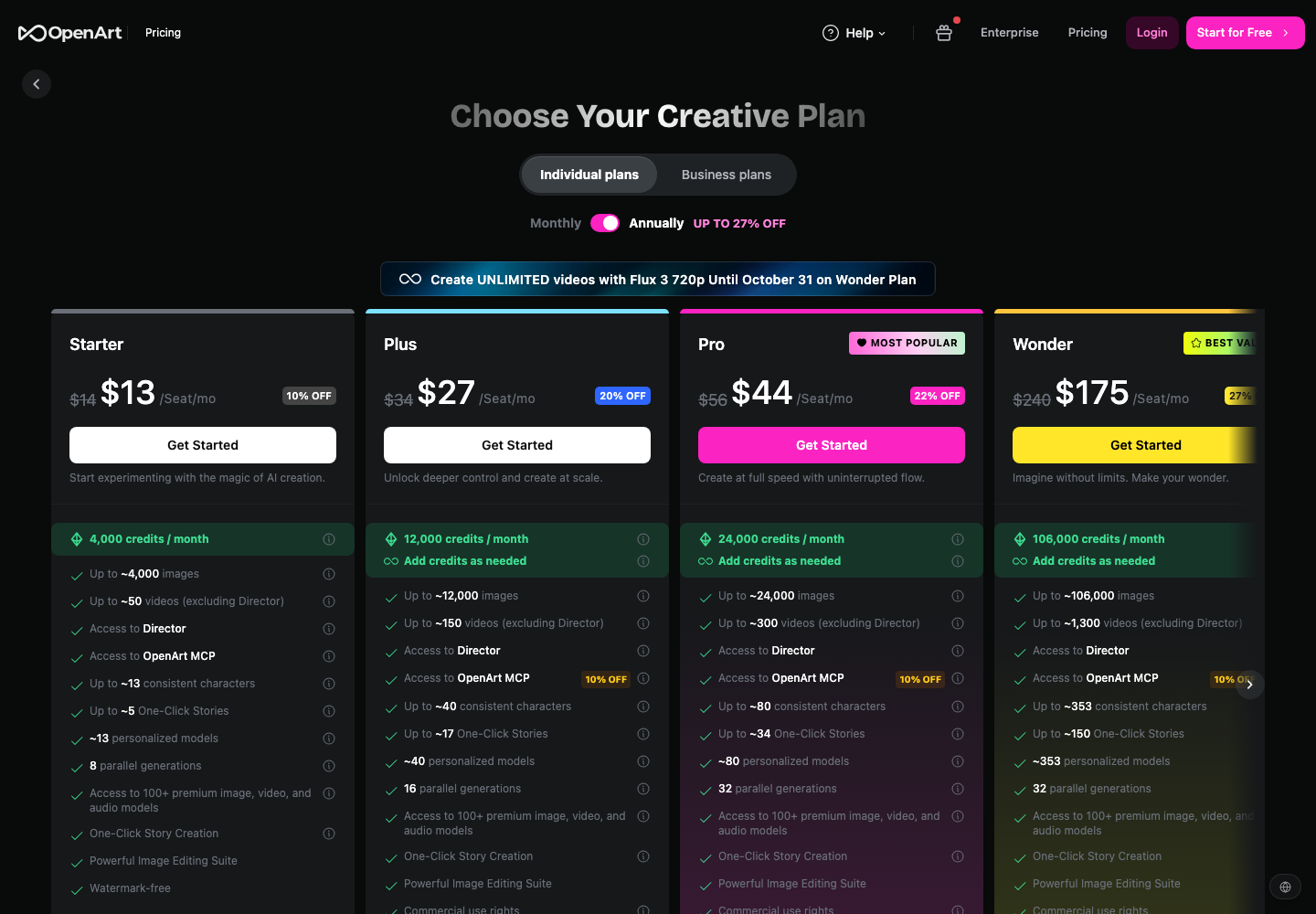
OpenArt
| Plan | Annual | Monthly | Credits/mo | ~Images | ~Videos | Parallel jobs | Watermark-free | Commercial use |
|---|---|---|---|---|---|---|---|---|
| Free | $0 | $0 | 40 one-time, expires in 7 days | ~40 | 0 | 4 | No | No |
| Starter | $13/seat | $14/seat | 4,000 | ~4,000 | ~50 | 8 | Yes | No |
| Plus | $27/seat | $34/seat | 12,000 | ~12,000 | ~150 | 16 | Yes | Yes |
| Pro | $44/seat | $56/seat | 24,000 | ~24,000 | ~300 | 32 | Yes | Yes |
| Wonder | $175/seat | $240/seat | 106,000 | ~106,000 | ~1,300 | 32 | Yes | Yes |
An extra credit pack is $15/month for 5,000 credits, available from Plus upward. Source: OpenArt pricing.
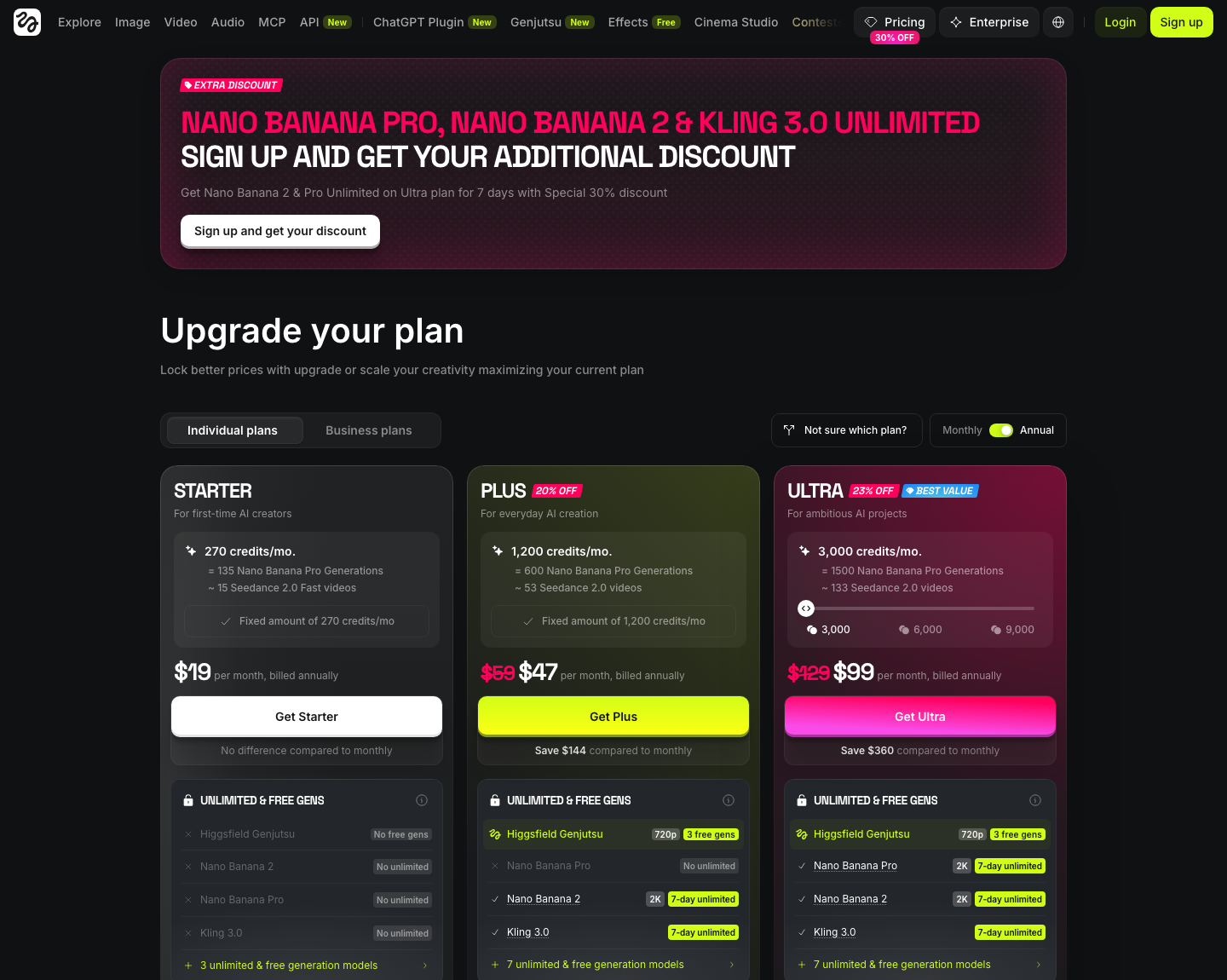
Higgsfield
| Plan | Annual | Monthly | Credits/mo | Concurrent jobs | Commercial use |
|---|---|---|---|---|---|
| Free | $0 | $0 | 0 (limited use) | 1 | No |
| Starter | $19 | $19 (same) | 270 | 2 video / 4 image | Yes |
| Plus | $47 | $59 | 1,200 | Unlimited paid parallel | Yes |
| Ultra | $99 | $129 | 3,000 (6,000 and 9,000 tiers available) | 8 | Yes |
Higgsfield also publishes what each model costs per generation. A sample, as of the same date:
| Model | Credit cost |
|---|---|
| Nano Banana Pro | 2 credits/image (4 at 4K) |
| Nano Banana 2 | 2 credits/image |
| Higgsfield Soul 2.0 | 0.12 credits/image |
| Higgsfield Soul, Reve, Soul Inpaint | 0.25 credits/image |
| Kling 3.0 720p | ~7 credits per 5s |
| Seedance 2.0 720p | ~22 credits per 5s (1080p ~45, 4K ~110) |
| Sora 2 720p | ~10 credits per 4s |
| Google Veo 3.1 720p | ~29 credits per 4s |
Source: Higgsfield pricing.
The credits are not the same unit
This is where almost every comparison of these two platforms goes wrong, including OpenArt's own.
4,000 OpenArt credits and 270 Higgsfield credits are not comparable numbers. One OpenArt credit is roughly one image. One Higgsfield credit buys a fraction of a generation on a cheap model and half a generation on an expensive one. Converted to cost per finished output at the entry tier:
| Output | OpenArt Starter ($13/mo) | Higgsfield Starter ($19/mo) |
|---|---|---|
| Image, flagship model | ~$0.0033 (~4,000 images) | ~$0.141 (135 Nano Banana Pro images) |
| Image, platform's own model | — | ~$0.0084 (2,250 Soul 2.0 images) |
| Video, 5s 720p | ~$0.26 (~50 videos) | ~$0.50 (~38 Kling 3.0 videos) |
At the next tier up:
| Output | OpenArt Plus ($27/mo) | Higgsfield Plus ($47/mo) |
|---|---|---|
| Image, flagship model | ~$0.0023 (~12,000 images) | ~$0.078 (600 Nano Banana Pro images) |
| Video, 5s 720p | ~$0.18 (~150 videos) | ~$0.27 (~171 Kling 3.0 videos) |
| Video, Seedance 2.0 720p | not separately priced | ~$0.87 (~54 videos) |
One honest caveat about this table. OpenArt's "~4,000 images" and "~50 videos" are the platform's own estimates and do not name a model, a resolution, or a clip length. Higgsfield publishes an exact credit cost for every model it hosts. So OpenArt's figures are a best case you cannot audit, and Higgsfield's are a floor you can. If you want to know in advance exactly what a 1080p Seedance clip will cost you, only one of these two platforms will tell you.
Three things the top results get wrong
Google's AI Overview says Higgsfield "starts around $9.99 per month." It does not. The Starter plan is $19/month, and unlike the higher tiers it costs the same whether you pay monthly or annually.
The same AI Overview describes OpenArt's free tier as "generous," with "50 daily credits and no watermarks." The current free plan is 40 one-time trial credits that expire after 7 days, with zero video generations and no watermark-free export. There is no daily credit refill.
OpenArt's own comparison page states that Higgsfield gives "120 credits for $19/mo." Higgsfield's pricing page shows 270 credits on that plan. Whichever number was right at some point, the one being published about a competitor is currently 2.25x too low.
None of this means the platforms are bad. It means the numbers circulating about them are stale, and you should check both pricing pages yourself before you subscribe. We date every figure on this page for the same reason.
Where OpenArt is stronger
Volume per dollar on images. This is not close. At every tier, OpenArt produces far more images per dollar than Higgsfield does on a flagship model.
Custom model training. Starter includes around 13 personalized models per month, Plus around 40. You train on a handful of reference images. Higgsfield has no equivalent.
Repeatable characters. Character creation is a first-class object, roughly 13 per month on Starter and 40 on Plus, which matters if the same face has to appear across a campaign rather than in a single shot.
Watermark-free from the entry plan. Higgsfield's free tier is limited use; OpenArt's Starter already exports clean.
Breadth of models in one subscription. 100+ image, video and audio models, plus a Director mode and one-click story assembly.
Where Higgsfield is stronger
Commercial use at the lowest paid tier. $19 versus $27. If you invoice for the output, this single line reverses the value conclusion.
Priced per model, auditable in advance. You can calculate the cost of a specific job before you run it. Reddit threads about these two platforms keep coming back to this point, and it is a real difference rather than a matter of taste.
Directed camera work. Cinema Studio exists to select a camera move instead of describing one in a prompt. If you know you want an FPV push-in, picking it from a list is faster and more repeatable than writing it.
Its own cheap image models. Soul 2.0 at 0.12 credits per image is the reason the second row of our normalized table exists. Used instead of a flagship model, it narrows the cost gap from roughly 43x to roughly 2.5x.
Named frontier video models. Seedance 2.0 up to 4K, Kling 3.0, Sora 2, Veo 3.1, Wan 3.0, each with a published price. OpenArt tells you how many videos you get; Higgsfield tells you which model produces them.
Both platforms run several of the same underlying image models, so part of this decision is really about the wrapper rather than the model. If it is the model you are unsure about, we compare them separately: Nano Banana 2 against Nano Banana Pro, GPT Image 2 against Nano Banana Pro, Imagen 4 against Nano Banana Pro, Seedream 5.0 Pro against GPT Image 2, and Midjourney against Nano Banana.
Which is cheaper, OpenArt or Higgsfield?
It depends on one question: are you allowed to sell the output?
If the work is personal or internal: OpenArt, clearly. $13 against $19 at the entry tier, and roughly 30x more images per dollar on a flagship model.
If the work is for a client or a product you sell: Higgsfield. Commercial rights cost you $19/month there and $27/month on OpenArt, so Higgsfield is the cheaper legal entry point by $96 a year.
If you mostly make video: closer than the image numbers suggest. OpenArt Plus works out around $0.18 per short clip against roughly $0.27 on Higgsfield Plus, but OpenArt does not say which model or resolution that buys. On a like-for-like premium model such as Seedance 2.0, Higgsfield is more expensive and tells you so up front.
Which is better for images?
OpenArt, for anything where you need many attempts. Generative editing is iterative, and the platform that lets you take 40 runs at a shot without thinking about credits is the one that gets you a usable frame.
Higgsfield is the better pick for a small number of images where you need a specific named model at a specific resolution, or where the image is one step in a video job you are already running there.
Which is better for video?
Higgsfield, if you care about direction. Selecting a camera move and knowing which model and resolution you are paying for are both real advantages over an approximate video count.
OpenArt is the better pick if video is a secondary output, you want volume over control, and you would rather not manage per-model credit math.
If you only need to change one photo, buy neither
Both of these are volume subscriptions. If the actual job is one existing photo and one specific change, a subscription is the wrong purchase.
Our AI Image Editor is an image-to-image workflow for exactly that case. Start with one change and check the result at full size before doing anything else:
- Replacing a setting: Add Background to Image, then inspect edges and the contact shadow.
- A faded print or damaged scan: Old Photo Restoration, then compare reconstructed detail against the original.
- A wider crop than you shot: AI Image Extender, then inspect the newly generated area.
This is not a claim that we beat either platform at video or at volume image generation. We do not do those things. It is a claim that a single photo edit does not justify $13 to $27 a month.
A 30-minute test before you subscribe
Both platforms let you generate something without paying. Use that, and use one real file rather than a demo prompt.
Run the same brief on each:
Keep the product shape, label text, camera angle and foreground position. Change only the background to a warm studio wall. Match the existing light direction and keep the contact shadow natural.
Then check three things:
- The result at final size. Lettering, edges, reflections, small accessories, skin texture.
- One revision. Ask for a single change and see whether the parts you approved survive it. This is where most tools fail and where a demo never tells you anything.
- The second asset. Repeat with a different pose or crop. Consistency across two outputs predicts your real workflow better than one attractive image.
For video, specify the subject action, camera move, duration, aspect ratio and delivery format, then generate a second shot and check whether the subject holds between them.
Record attempts, accepted outputs and credits spent. Divide credits by accepted outputs. That number, not the credit total on the pricing page, is what the subscription actually costs you.
Frequently asked questions
Is OpenArt better than Higgsfield?
For image volume and custom model training, yes. For commercial licensing at the entry tier, directed camera work and knowing a job's cost before you run it, no. If you are picking on price alone and the work is personal, OpenArt. If you sell the work, Higgsfield's $19 plan is the cheaper legal entry point.
Is Higgsfield better than OpenArt for video?
For directed video, yes. It publishes per-model, per-resolution pricing and offers preset camera moves, so you can plan a shot and its cost together. OpenArt gives you a larger approximate video count without saying which model produces it.
Is OpenArt cheaper than Higgsfield?
At the entry tier, $13 against $19, and roughly 30x more images per dollar on a flagship model. But OpenArt's commercial use rights start at $27/month while Higgsfield includes them at $19, so for paid work the answer flips.
Is Higgsfield only for video?
No. It hosts Nano Banana Pro, Nano Banana 2, Seedream, Flux, GPT Image and its own Soul and Reve models for still images, with published per-image credit costs.
Can OpenArt make AI videos?
Yes, from the Starter plan up, roughly 50 videos per month at $13. The free plan includes zero video generations.
Which has a better free plan?
Neither is usable for real work. OpenArt gives 40 one-time trial credits that expire in 7 days with no video and no watermark-free export. Higgsfield's free tier has 0 credits, one concurrent job and no commercial use. Treat both as a look around, not a trial of the workflow.
Should I use Img2Img AI instead?
Only if your job is a specific edit to a photo you already have. For recurring characters, model training or directed video, compare the two platforms above.
The bottom line
Personal image work: OpenArt Starter at $13/month. Client work at the lowest possible price: Higgsfield Starter at $19/month, because the commercial licence is included. Directed video where you need to know the cost in advance: Higgsfield. One photo, one change: neither.
Whatever the comparison tables say, check both pricing pages on the day you buy. The figures on this page were verified on 20 September 2026, and the two most-cited sources about these platforms were already wrong when we checked.
