
A biruli trending prompt is a ready-made AI photo prompt that turns an ordinary selfie into a cinematic portrait while keeping your face exactly as it is. You do not write anything. You copy the text, upload your photo, and generate.
Below are 18 prompts you can copy right now, sorted by what you actually want to make: boys, girls, couples, Instagram posts, selfies, and short videos. Every one of them keeps the face locked to your uploaded photo. Scroll to your section, tap copy, paste it into Gemini or ChatGPT, and you are done.
What Is a Biruli Trending Prompt?
It is a prompt style that spread through Instagram Reels, WhatsApp, and YouTube Shorts across India in 2026. Creators like Ankit Maurya Editz shared them through biruli.in, and the format stuck because it needs zero prompt-writing skill.
Every prompt in this style does three things:
- Locks your identity. The first line always says something like "keep the exact facial features" or "use the uploaded photo as the only identity source."
- Describes one specific scene. Rain on a wet road, a sunset valley, a night street with a mural.
- Adds camera language. An 85mm lens, f/1.8, shallow depth of field. These words push the model toward a photo finish instead of a cartoon.
That is the whole formula. Once you see it, you can read any prompt in this genre in about five seconds.
How to Use These Prompts in Gemini or ChatGPT
Four steps. Takes under a minute.
- Pick a clear source photo. Good light, face fills a decent part of the frame, no heavy filters. This matters more than the prompt.
- Copy a prompt below. Tap the copy button on any prompt box.
- Open your AI tool. Google Gemini, ChatGPT, or any image editor that accepts a photo plus text. Upload your photo first, then paste the prompt.
- Set the ratio before generating. 4:5 for feed posts, 9:16 for reels and stories, 1:1 for a DP.
If your tool gives you a weak result, it is almost always the source photo, not the prompt. A blurry input cannot produce a sharp face.
Here is the kind of photo these prompts start from. Nothing special about it, just a plain selfie against a blank wall:
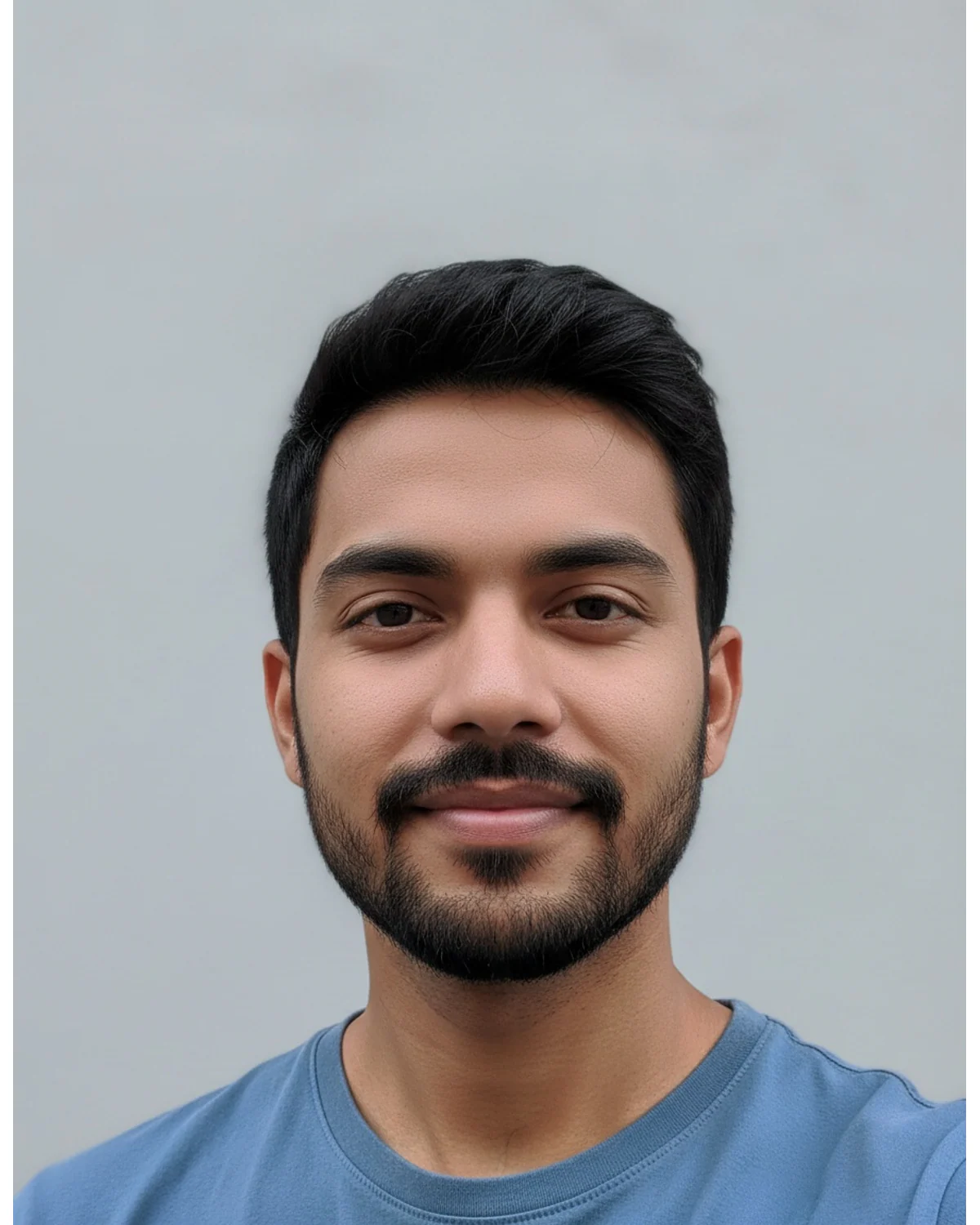
The boys, Instagram, and video results below all came from that exact photo. The girls and selfie results used a similar plain selfie of someone else, and the couples result used one photo of both people together. Compare the faces as you scroll — holding them steady is the whole job of the identity lock.
Want to skip the app-switching? You can run these prompts directly in our AI image editor — upload, paste, generate, all on one screen.
Biruli Trending Prompt for Boys
Five prompts built around attitude, motion, and moody light. These are the most-copied ones in the whole style.
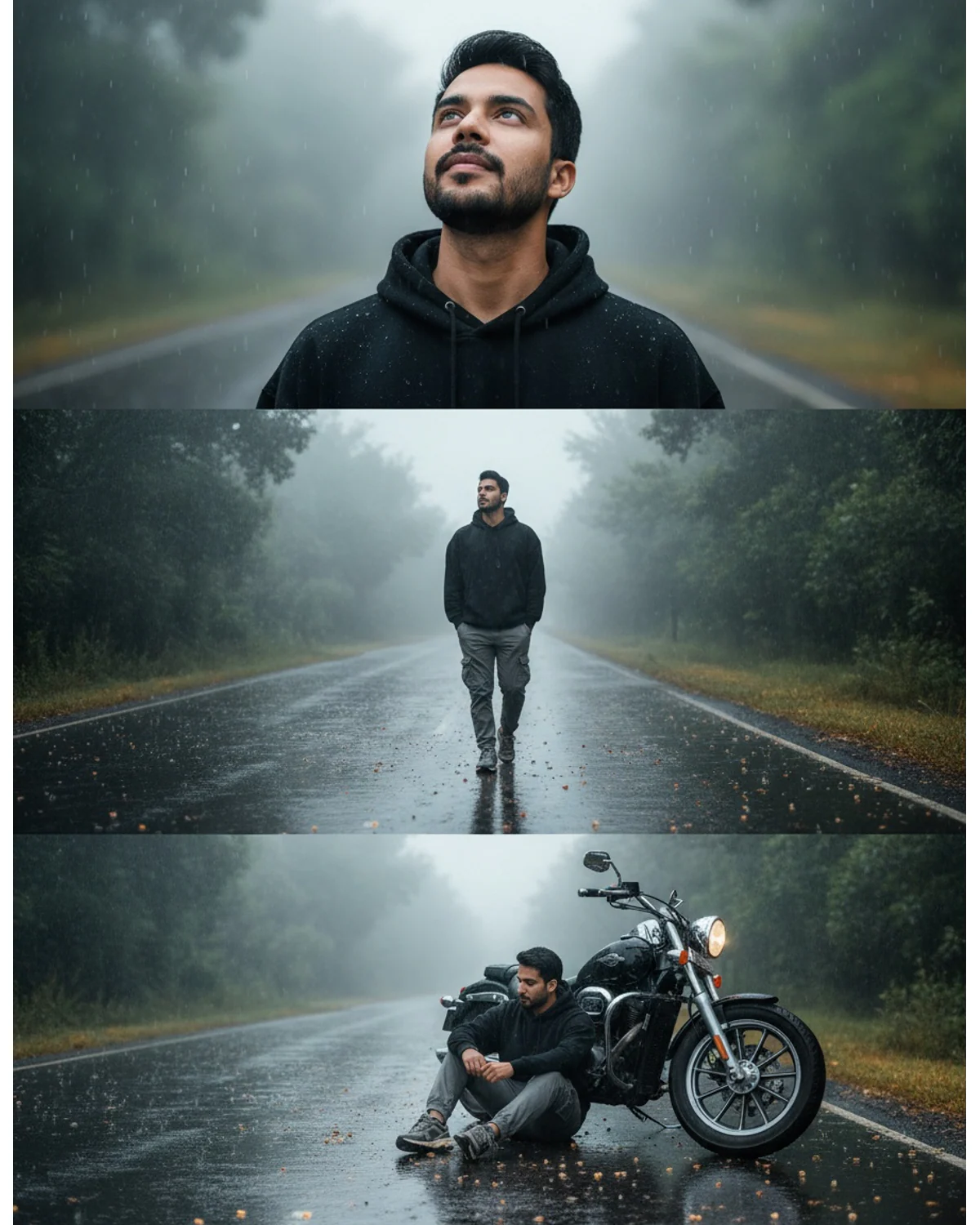
1. Rainy three-frame collage
Best for reel covers and emotional posts.
Vertical 4:5 cinematic collage with three emotional frames after rain, same exact face in all frames, preserve facial features, hairstyle, and skin tone perfectly. Black oversized hoodie, grey cargo pants, sneakers. Top frame: looking upward at the sky with raindrops on the face. Middle frame: walking alone on a wet reflective road. Bottom frame: sitting thoughtfully beside a motorcycle. Foggy atmosphere, green trees, glowing puddle reflections, realistic rain particles, soft dreamy transitions between frames, DSLR realism, premium HDR lighting, sharp skin texture.
Swap the outfit and the three actions. Do not touch "same exact face in all frames" — multi-frame prompts are the most likely to give you three different-looking people.
2. Night street mural portrait
Best for street-style edits with scale and drama.
Ultra-realistic cinematic night street portrait of a young man standing with his back to the camera, looking up at a giant hyper-detailed mural painted on an old urban wall. Keep the exact facial features and hairstyle from the uploaded photo. Wet reflective road after rain, warm orange streetlight glow, black and amber color grading, soft fog, realistic wall texture. The mural shows a powerful mythological figure with intricate details and covers most of the wall. Strong depth and scale contrast between the small human figure and the giant artwork. White oversized shirt, loose blue jeans, realistic sneakers, natural posture, shallow depth of field, photorealistic, contemplative mood.
The mural is fully swappable — a tiger, a wave, a deity, an abstract face. Keep the size contrast extreme or the shot loses its punch.
3. Royal sherwani portrait
Best for festival posts, wedding season, and profile refreshes.
Ultra-realistic cinematic portrait in 4:5 ratio using the uploaded photo as the only identity source. Preserve exact facial features, hairstyle, skin tone, and beard shape. The person wears a deep maroon embroidered sherwani with gold detailing and a cream dupatta, standing in an old haveli courtyard with carved sandstone arches. Warm golden hour light falling from the left, soft dust particles in the air, shallow depth of field, 85mm lens look, rich color grading, photorealistic skin texture, confident relaxed posture.
Change the sherwani color and the architecture to match your event. The golden-hour light is what sells it — keep that line.
4. Gym mirror attitude shot
Best for fitness accounts and progress posts.
Ultra-realistic gym mirror portrait, 4:5 vertical. Use the uploaded photo as the only face reference and preserve facial features, hairstyle, and skin tone exactly. Black sleeveless training top, grey joggers, white sneakers. Standing in front of a large gym mirror holding a phone at chest height, natural confident expression. Dark industrial gym background with rubber flooring and racked dumbbells, moody overhead lighting with cool blue fill from the side, realistic sweat sheen on skin, sharp detail, cinematic contrast, shallow depth of field.
Do not ask for an exaggerated physique. Models tend to overshoot it and the face stops matching the body.
5. Vintage bike sunset silhouette
Best for travel posts and captions about the road.
Cinematic 4:5 portrait at sunset. Keep the exact face, hairstyle, and skin tone from the uploaded image without any change. The person sits sideways on a vintage motorcycle parked on an empty highway, looking toward the horizon. Warm orange and deep purple sky, long shadows, dust in the air catching the light, distant hills. Denim jacket, plain white tee, boots. Strong rim light outlining the shoulders and hair, 85mm lens, f/1.8, natural film grain, photorealistic finish.
Rim light is the trick here. Without that line you get a flat silhouette with no face detail.
Biruli Trending Prompt for Girls
Four prompts leaning softer — pastel light, traditional wear, and cafe aesthetics.
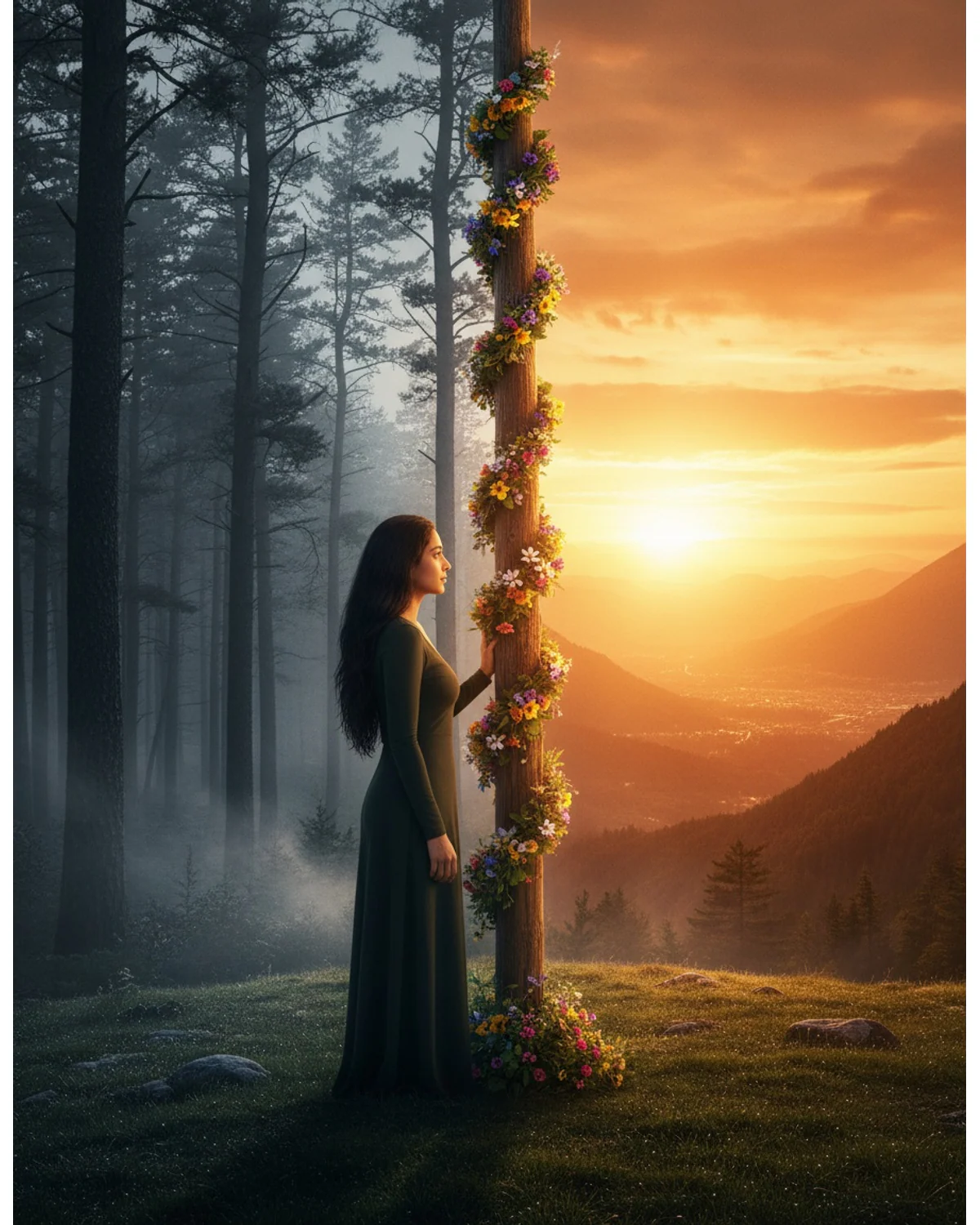
6. Split-tone cinematic poster
Best for dramatic DPs and announcement posts.
Ultra-realistic cinematic portrait poster in 4:5 ratio using the uploaded photo as the only identity source. Preserve exact facial identity, hairstyle, and body proportions. The person stands on the left side of the frame in side profile, one hand touching a tall wooden pole at the exact center. Left half of the scene: dark moody forest in desaturated grey tones. Right half: glowing orange sunset sky with warm golden light, a mountain valley, and distant town lights below. Grassy hilltop foreground, flower garland wrapped around the pole, strong contrast between the cold and warm sides, photorealistic, 8K detail.
You can swap the pole for a tree, a doorway, or a mirror edge. Keep the placement wording — the composition falls apart without it.
7. Saree golden hour portrait
Best for festival photos and family feed posts.
Ultra-realistic 4:5 portrait using the uploaded photo as the only face reference. Preserve exact facial features, hairstyle, and skin tone. The person wears a flowing pastel pink chiffon saree with subtle gold border, standing on an open terrace during golden hour. Soft warm backlight through the fabric, gentle breeze lifting the pallu, blurred city skyline behind, warm haze. Natural makeup, soft smile, 85mm lens, f/1.8, shallow depth of field, photorealistic skin texture, no over-smoothing.
"No over-smoothing" is doing real work — most models will plastic-wrap the skin unless you block it.
8. Rainy cafe window
Best for aesthetic posts and quiet captions.
Cinematic indoor portrait in 4:5 ratio. Keep the exact facial features, hairstyle, and skin tone from the uploaded photo. The person sits by a large cafe window on a rainy afternoon, both hands around a warm ceramic cup, looking out at the street. Rain streaks on the glass, soft grey daylight, warm interior lamp glow on one side of the face. Oversized cream knit sweater. Blurred wooden interior with plants, shallow depth of field, 50mm lens, muted film color grading, calm mood, photorealistic.
The two light sources — cool from the window, warm from the lamp — are what make this look photographed rather than rendered.
9. Flower field pastel dream
Best for birthday posts and soft aesthetic feeds.
Ultra-realistic 4:5 outdoor portrait. Use the uploaded image as the only identity source and preserve facial features, hairstyle, and skin tone exactly. The person stands in a wide field of pale lavender and white wildflowers at early morning, wearing a flowing white cotton dress. Soft diffused light, light mist near the ground, pastel color palette, gentle wind in the hair. Wide shot with the subject centered, 85mm compression, creamy bokeh in the foreground flowers, dreamy but photorealistic finish.
Foreground bokeh is the detail most people skip. It adds the depth that makes a flat field look cinematic.
Biruli in Photo for Couples
Two prompts where the hardest part is keeping both faces intact.
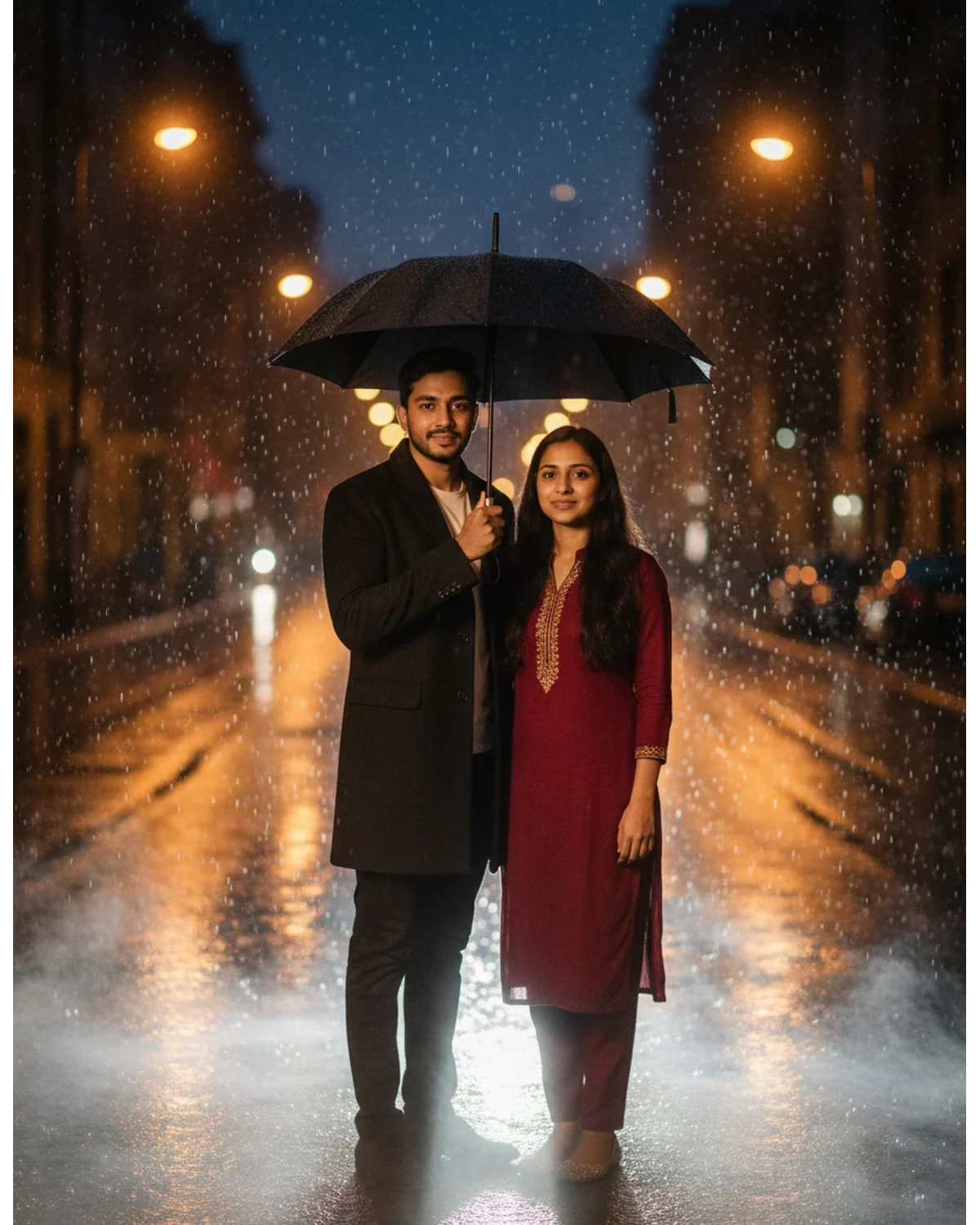
10. Rainy street umbrella
Best for anniversary posts.
Cinematic 4:5 couple portrait after rain. Use both people from the uploaded photo as the only identity sources and preserve both faces, hairstyles, and skin tones exactly — do not merge or alter either face. They stand close under a single black umbrella on a wet city street at night. Warm streetlight glow, reflections on the road, soft fog, falling rain caught in the light. He wears a dark overcoat, she wears a deep red kurta. Shallow depth of field, 85mm lens, warm and cool color contrast, photorealistic, intimate quiet mood.
"Do not merge or alter either face" is the line that matters. Couple prompts fail by blending features between the two people.
11. Traditional wedding portrait
Best for engagement and wedding announcements.
Ultra-realistic cinematic wedding portrait in 4:5 ratio. Preserve both faces from the uploaded photo exactly, including facial features, hairstyles, and skin tones, with no blending between the two people. The couple stands together in traditional Indian wedding attire — red and gold lehenga, cream sherwani with a maroon turban — in a decorated courtyard with marigold garlands and hanging lanterns at dusk. Warm candlelight tones, soft golden bokeh behind them, natural relaxed posture, 85mm lens, f/2.0, rich color grading, photorealistic fabric and jewelry detail.
Ask for fabric and jewelry detail explicitly or the outfits render as flat colored shapes.
Biruli in Post: Instagram Feed Prompts
Three prompts built specifically for how a feed looks, not just how one photo looks.
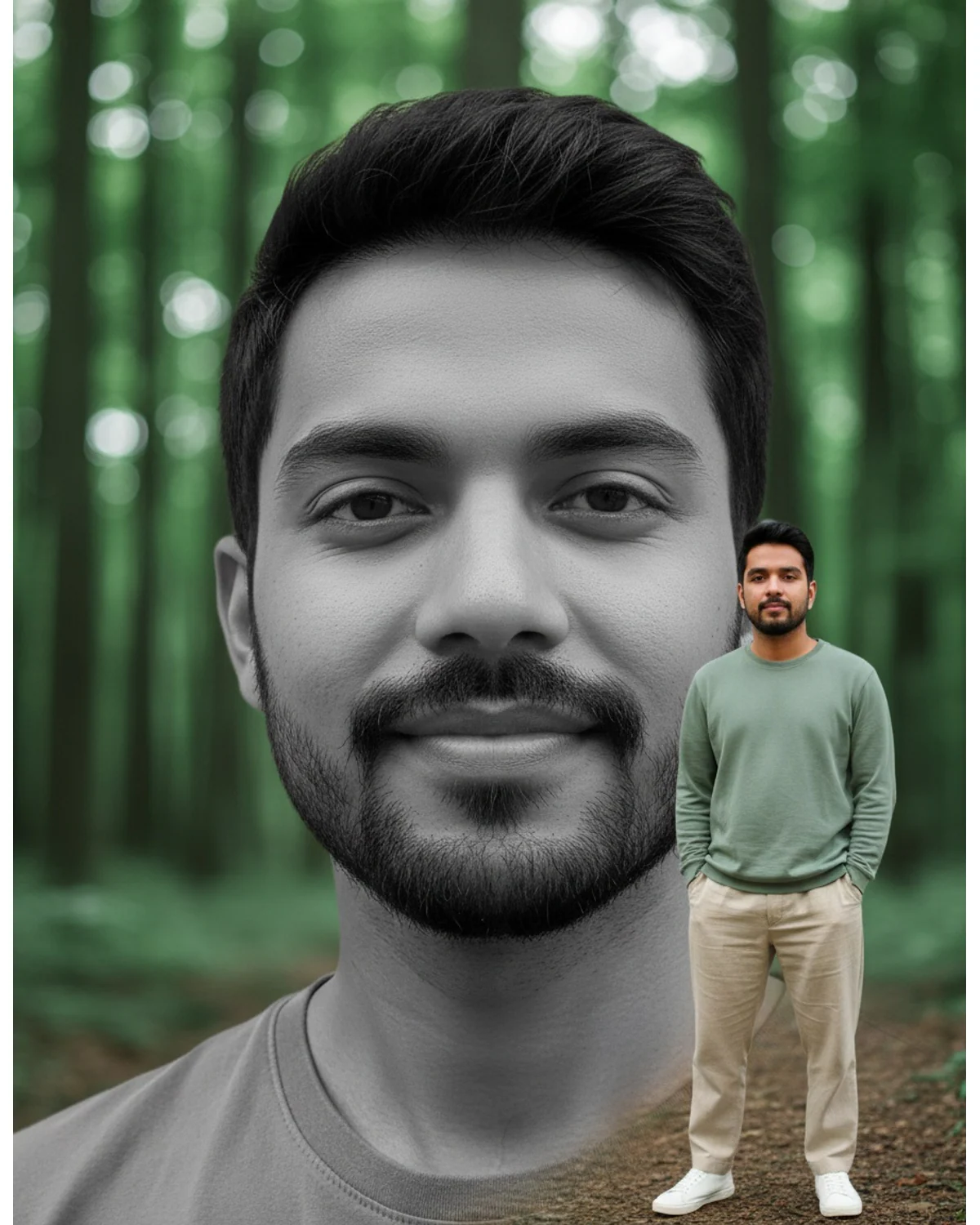
12. Layered black-and-white DP edit
Best for a profile picture refresh.
Ultra-premium portrait DP edit in vertical 4:5 ratio. Use the person from the reference photo, keep facial features, hairstyle, and skin tone perfectly unchanged. Layer one: a massive desaturated black-and-white close-up of the face filling the background, soft blurred forest behind with large green bokeh circles. Layer two: the same person in sharp full color, a small full-body figure in the right foreground, sage green casual shirt, beige linen trousers, white sneakers, hands in pockets on a forest path. Vivid color against the monochrome background, fresh nature palette, premium natural HDR, sharp detailed finish.
The two-layer structure works with any palette. Deep red against a city backdrop, royal blue against a beach — same logic.
13. Nine-frame story grid
Best for a carousel or a feed block.
Nine-frame 3x3 grid portrait collage in 1:1 ratio, cinematic film look. Same exact face in every frame, preserved from the uploaded photo — identical facial features, hairstyle, and skin tone across all nine panels. Each frame shows the same person in one continuous evening scene from a different angle and distance: wide street shot, mid shot walking, close-up profile, hands in pockets, looking back over the shoulder, and so on. Consistent warm amber streetlight grading across all frames, thin white gutters between panels, 35mm film grain, photorealistic.
Nine frames is the point where models start drifting. Repeat the identity instruction inside the prompt, as this one does, and it holds much better.
14. Quote poster portrait
Best for caption-heavy posts and page branding.
Cinematic 4:5 poster layout. Keep the exact face, hairstyle, and skin tone from the uploaded photo. The person stands on the right third of the frame in a dark charcoal jacket, looking slightly off camera, lit by a single hard light from the left against a deep matte black background. Leave the entire left half of the frame clean and empty for text overlay. Strong rim light on the shoulder and jaw, high contrast, minimal grain, editorial magazine finish, photorealistic.
Asking for empty space is the whole trick. Otherwise the model centers the subject and your caption has nowhere to go.
Biruli in Viral Photo and Selfie Prompts
Two prompts that start from a plain phone selfie.
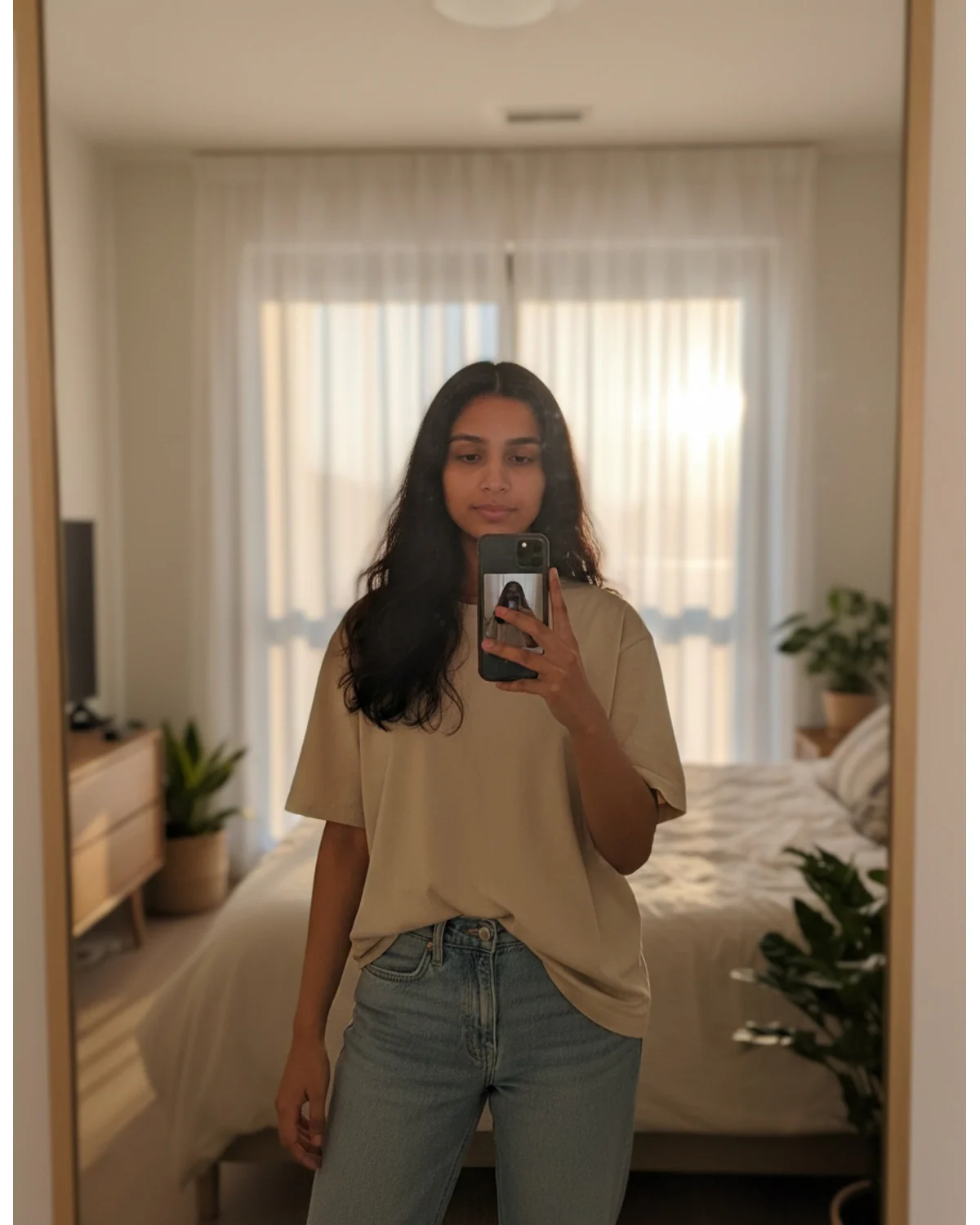
15. Mirror selfie upgrade
Best for turning a casual phone photo into something postable.
Ultra-realistic mirror selfie in 4:5 vertical ratio. Use the uploaded photo as the only identity source and preserve facial features, hairstyle, and skin tone exactly. The person holds a phone at chest height in front of a full-length mirror in a modern bedroom with warm evening light through sheer curtains. Relaxed natural pose, plain beige oversized tee and light denim. Soft realistic shadows, slight lens flare on the mirror edge, natural skin texture with visible pores, no beauty filter, shallow depth of field, photorealistic.
"No beauty filter" and "visible pores" fight the model's default smoothing. Keep both.
16. Polaroid stack
Best for throwback posts and birthday carousels.
Photorealistic overhead shot of four polaroid photos scattered on a light wooden table, 1:1 ratio. Every polaroid shows the same person from the uploaded photo with identical facial features, hairstyle, and skin tone preserved exactly — only the pose and setting change between them. One at a beach, one in a cafe, one on a night street, one laughing outdoors. Slightly faded polaroid color, white borders, soft natural window light across the table, realistic paper texture and subtle shadows under each photo, shallow depth of field.
The fun of this one is that four "different photos" come from one upload. Keep the identity clause or you get four strangers.
Biruli in Motion: Video Prompts
Two prompts for tools that generate short clips from a still image.
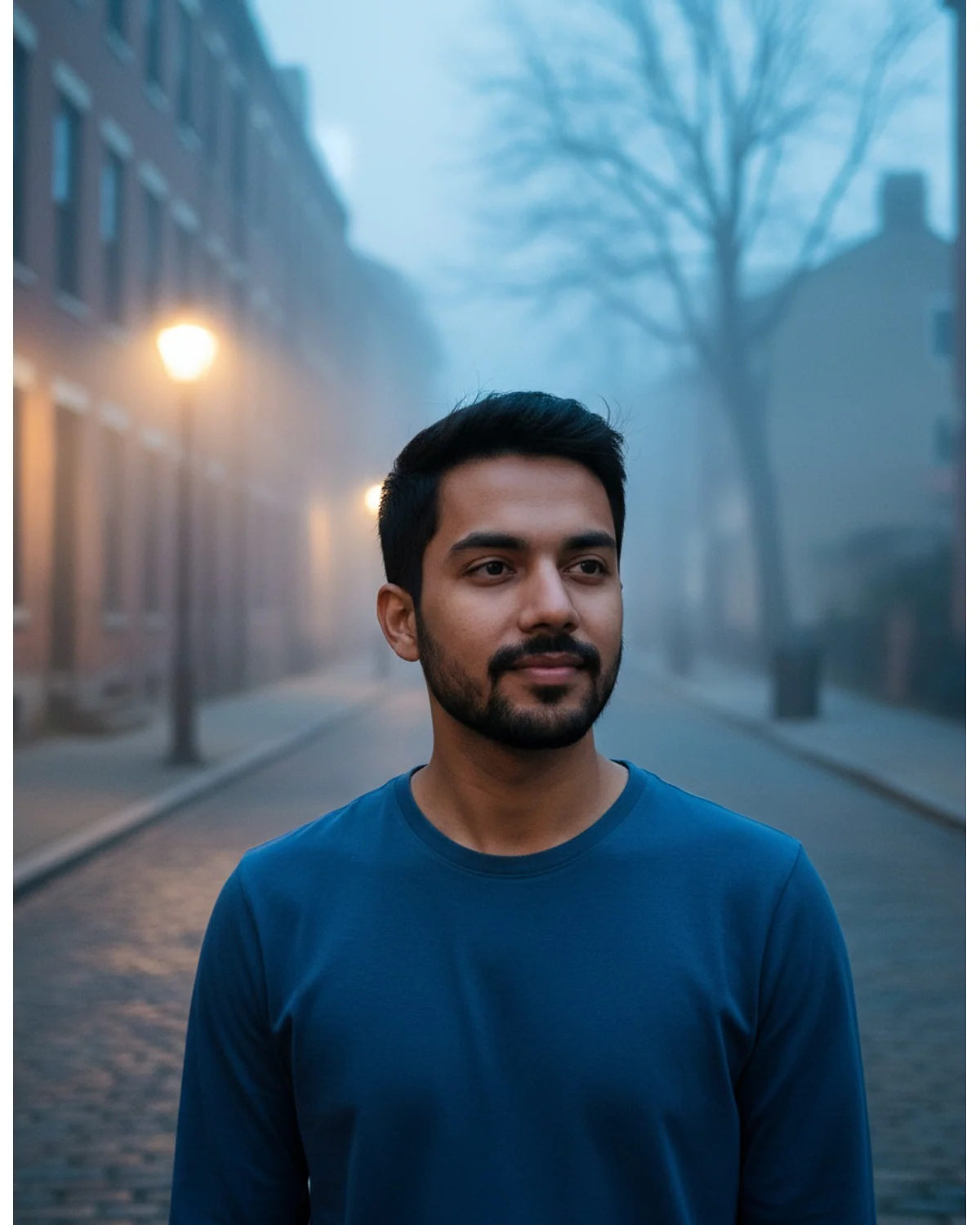
17. Subtle cinemagraph loop
Best for a reel cover that moves.
Animate the uploaded portrait as a subtle 3-second seamless loop. Keep the face completely still and unchanged — no change to facial features, expression, or identity. Animate only the environment: hair moving gently in the wind, fabric shifting slightly, falling rain in the background, and slow drifting fog. Camera stays locked with no movement. Natural motion speed, no warping or morphing of the face, photorealistic.
"No warping or morphing of the face" is not optional. Video models distort faces first.
18. Slow camera push-in
Best for an intro clip or a story opener.
Animate the uploaded portrait as a 4-second cinematic shot with a slow, steady camera push-in toward the subject. Preserve the face and identity exactly with no morphing, warping, or expression change. Background elements move naturally with parallax — leaves shifting, light flickering softly. Smooth constant motion speed, no shake, shallow depth of field increasing slightly as the camera moves closer, photorealistic film look.
Say the duration and the speed. Left open, most tools produce a jerky zoom.
How to Adapt Any Biruli Prompt
Every prompt above is the same five slots with different values. Change these, keep everything else:
- Subject — only if the original is very different from you.
- Outfit — the easiest swap and the one that makes it feel personal. Use clothes you actually wear.
- Environment and lighting — swap them as a pair, never separately, or the scene stops making sense.
- Poses and frame count — keep the emotional arc, change the specific actions.
- Aspect ratio — 4:5 feed, 9:16 reels, 1:1 DP.
The identity sentences and the camera language should survive your edits mostly untouched. Those two parts are what make the style work.
Why These Prompts Work
Identity preservation comes first. Nearly every biruli trending prompt opens with strict face-protection language: "keep the exact facial features," "same exact face in all frames," "use the uploaded photo as the only identity source." That is the core promise of the genre. The trend is not fantasy art; it is a sharper version of you. Vague lines like "make it look like me" give the model room to guess. Explicit constraints covering facial features, hairstyle, skin tone, and expression narrow that room considerably.
Multi-frame collages tell a story. Instead of one scene, many prompts describe two or three stacked frames. The collage turns a single image into a mini narrative, which is exactly what performs as a reel cover. The frames follow an emotional arc — anticipation, movement, rest — not random poses.
Environment carries the mood. Rain, fog, night streets, sunset valleys. The setting is not decoration here. The strongest prompts pair weather with light: rain with streetlight reflections, fog with cool morning tones, sunset with warm rim light. That pairing is what makes a scene feel photographed rather than rendered.
Camera language sets the finish. An 85mm lens, f/1.8, shallow depth of field, DSLR bokeh. You do not need to understand photography — the words themselves steer the render. One lens reference, one aperture cue, and one lighting cue is enough. Stacking five camera models just adds noise.
Common Mistakes and Quick Fixes
The output looks like a stranger. The most common failure by far. Three causes, in this order: a blurry or filtered source photo, a preservation sentence you edited or deleted, or a scene description so long it drowned out the identity instructions. Shorten the scene, strengthen the identity line, use a sharper photo.
The frame is cluttered. Usually from stacking too many effects — smoke, neon, particles, and glass panels in one prompt. Remove one at a time. Quick test: squint at the thumbnail. If you cannot find the person within a second, it is too busy.
The mood does not match. A stormy dramatic prompt with a bright smiling selfie confuses the model. Pick a source photo whose expression roughly matches the target scene.
The crop is wrong. Set the ratio before generating, not after. Cropping a finished image throws away composition the prompt worked to build.
FAQ
What are the trending biruli ChatGPT prompts for photo editing?
The most-copied ones right now are the rainy three-frame collage, the split-tone cinematic poster, and the layered black-and-white DP edit — all three are in this guide. They work in ChatGPT, Gemini, and any editor that accepts a photo plus text, because they rely on plain descriptive language rather than tool-specific syntax.
Are these prompts free to copy?
Yes. Every prompt on this page is free to copy, edit, and use, including for posts you monetize. You do not need to credit this page.
Which AI tool works best for these — Gemini, ChatGPT, or something else?
Any tool that takes an uploaded reference photo plus a text prompt will run these. The difference is how strictly each model follows preservation language. Photo-first editors generally beat pure text-to-image generators on identity accuracy. Expect to regenerate a few times when you switch tools. You can also run any of these prompts here without switching apps.
Why does my result look like a different person?
Almost always a weak source photo, a deleted preservation sentence, or a scene description that overwhelmed the identity instructions. Fix them in that order. If you are generating a multi-frame collage, repeat the identity instruction inside the prompt — that alone fixes most cases.
Can I use these for Instagram reels and WhatsApp DP?
Yes. Set 9:16 for reels and stories, 1:1 for a WhatsApp or Instagram DP, and 4:5 for a feed post. Change the ratio inside the prompt before you generate.
Is it spelled biruli or buruli?
Biruli, after biruli.in where the style spread. People search it as buruli, biroli, birauli, and a dozen other ways, so if you found this page through one of those, you are in the right place.
How often does this style change?
Fast — a new prompt family shows up every few weeks, usually tied to a season or festival. The four building blocks stay stable even when the surface theme rotates, which is why learning the structure beats collecting individual prompts.
Try One on Your Own Photo
Pick the prompt closest to what you want, copy it, and run one real edit. Upload a selfie and paste any prompt from this page — then change the outfit and the location until the result actually looks like you.
Want more in this style? See our AI prompts for boys and the wider trending AI photo prompt collection.
