
trending ai photo prompt: use the trend as a brief, not a magic sentence
The best trending ai photo prompt is a controlled editing brief: start with a clear base photo, say what must stay recognizable, name the visual trend, describe the visible details that prove the trend, and set the final format before you generate. Copy-paste prompts can give you ideas, but the results become more reliable when you adapt the prompt to the image in front of you.
That matters because current AI photo trends are no longer just "make it aesthetic." The strongest prompt cases usually fall into repeatable families: cinematic film portraits, direct-flash Instagram edits, scrapbook collages, toy or miniature transformations, fashion editorials, nostalgic time-travel scenes, visual style comparisons, and multi-scene character consistency. Each trend works for a different reason. A film prompt sells mood. A collage prompt sells abundance. A flash prompt sells immediacy. A toy prompt sells play. A consistency prompt sells story.
So the practical answer is this: do not hunt for one perfect trending ai prompt. Build a small prompt system you can reuse, then swap the trend details for the platform, photo, and audience. This guide gives you that system, plus prompt cases you can adapt for Instagram, profile photos, reels covers, and creator visuals.
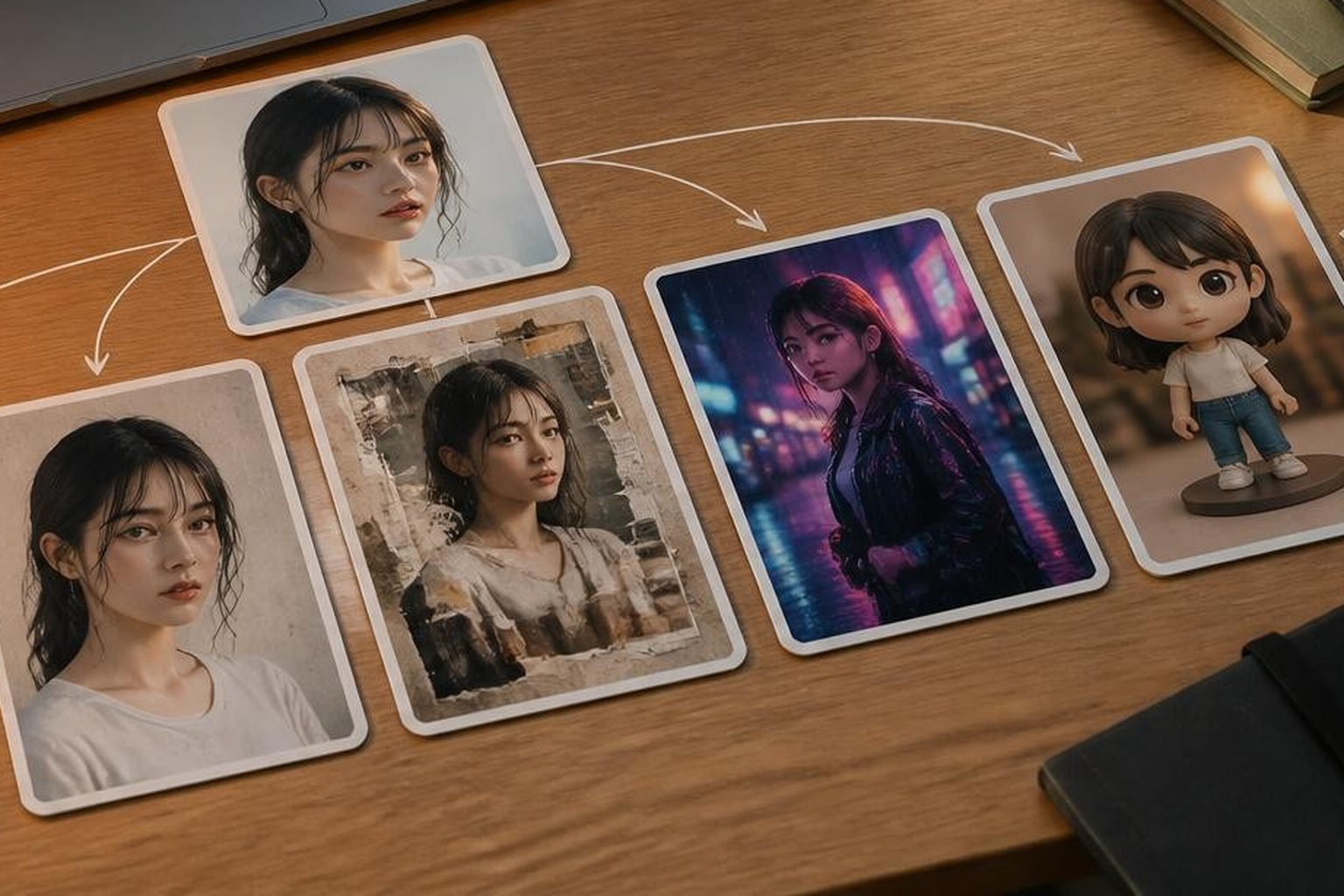
The prompt formula behind a reliable trending image prompt
A strong trending image prompt has six parts. You do not need to make every prompt long, but you should know which part you are using.
1. Base image quality
Start with a photo that gives the model enough information to preserve the subject. A sharp portrait, outfit shot, couple photo, product image, or lifestyle frame works better than a cropped, blurry, heavily filtered image. If the face, hair, clothing, or pose is important, the upload should show those details clearly.
Weak input plus a dramatic prompt often produces identity drift. The result may look polished, but it can quietly change the face, skin tone, body proportions, outfit shape, or expression. For a social post, that is usually the first thing people notice.
2. Preservation rules
For photo editing, preservation rules are more important than style words. Tell the model what not to change.
Useful preservation language:
- Preserve the person's facial identity, skin tone, hairstyle, expression, and body proportions.
- Keep the outfit shape and colors recognizable.
- Keep the original camera angle and natural pose.
- Change only the background and lighting style.
- Do not reshape the face, smooth the skin unnaturally, or invent extra accessories.
Use the rules that matter for the image. A hairstyle prompt needs hair preservation. A fashion prompt needs outfit preservation. A couple edit needs both people's identities and relative positions preserved.
3. Trend family
Name the trend family instead of using vague words like "viral" or "aesthetic." A clear trend family gives the model a visual target.
Common families include:
- Cinematic film portrait
- Direct-flash Instagram photo
- Scrapbook collage
- Vintage magazine layout
- Y2K camcorder look
- Golden-hour lifestyle portrait
- Neon street portrait
- Miniature toy or collectible figure
- Fashion editorial
- Beauty, hairstyle, or color comparison
- Four-panel story sequence
This is where secondary keywords such as instagram trending photo prompt and trending pic prompt become useful. They describe the searcher's real intent: a prompt that creates a specific social-media-ready visual, not a general AI art experiment.
4. Visible evidence
Trend words only work when they become visible details. Instead of writing "make it cinematic," describe what cinematic should look like.
Better details:
- Soft side light, shallow depth of field, realistic skin texture, subtle film grain.
- Direct flash, strong subject separation, deep background shadows, candid camera feel.
- Torn paper edges, layered photo prints, masking tape, muted retro textures.
- Low-angle street scene, wet pavement reflections, neon signs blurred in the distance.
- One main portrait and three supporting close-up panels from the same identity.
Visible evidence keeps the prompt from becoming a mood label.
5. Composition and format
Decide the output format before generation. A profile photo, Instagram feed post, Story, reels cover, blog hero, and product visual need different framing.
Useful format instructions:
- Square crop for an Instagram feed post.
- Vertical composition for a Story, with the face clear at mobile size.
- Close portrait crop for a profile image.
- Wide 3:2 landscape crop for a blog or thumbnail.
- One large central portrait plus three smaller supporting frames.
- No readable text, no logos, no watermark.
This is the difference between a pretty image and a usable image.
6. One-step revision
Do not overload the first prompt with every detail you can imagine. Generate a strong base result, then revise one thing at a time: warmer light, less blur, more natural skin texture, cleaner background, stronger outfit detail, or better face preservation.
If the result starts drifting, repeat the preservation rules in the next message. Short targeted revisions are usually easier to control than a giant prompt that tries to solve every failure at once.
Prompt case library: adapt these trending AI photo prompts
Use these as working examples. Replace the bracketed parts with details from your photo, then remove anything that does not fit your image.
Cinematic film portrait prompt
Use this when the face is the hero and you want a polished but believable edit.
Prompt:
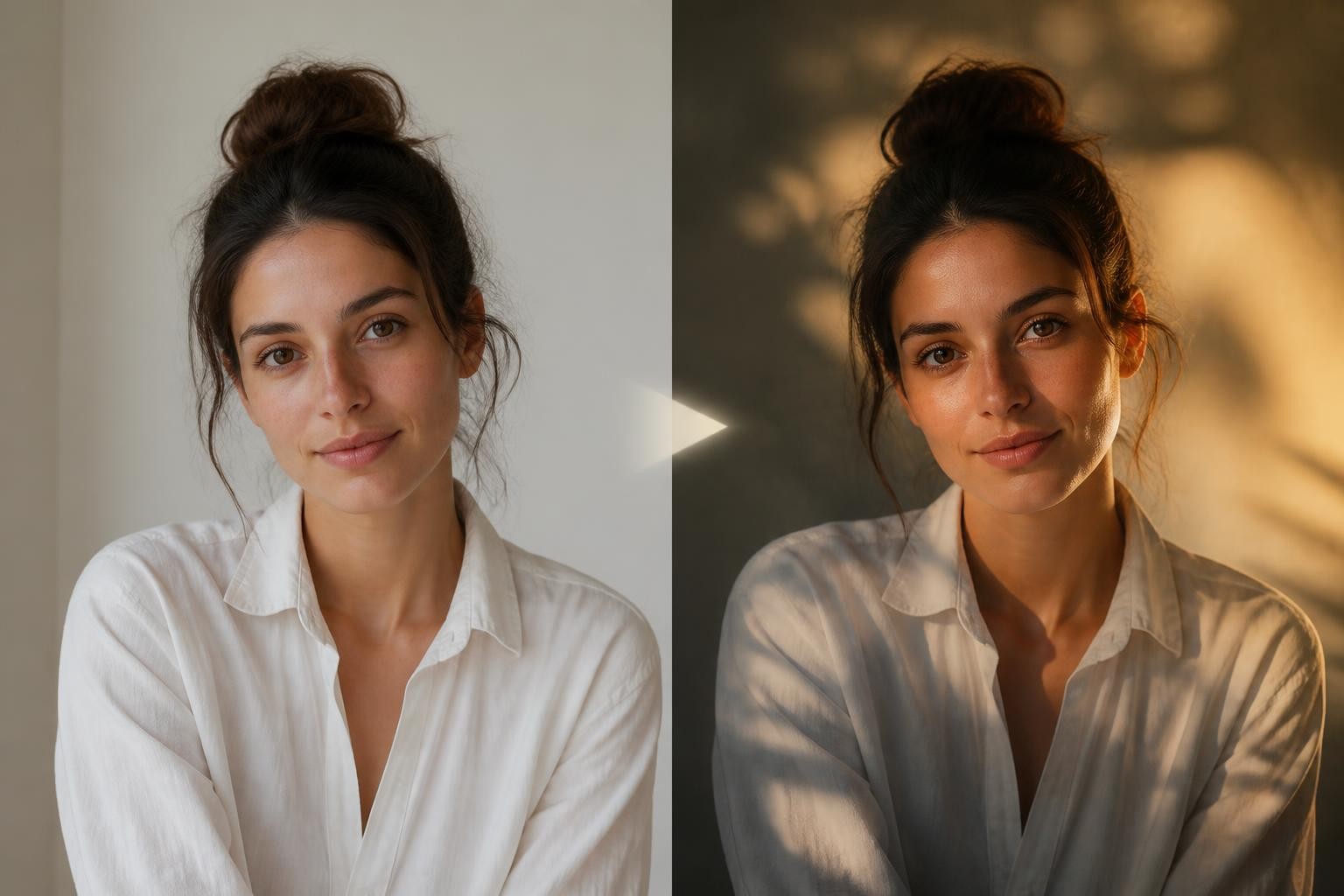
Edit this photo into a cinematic film portrait. Preserve the person's facial identity, skin tone, hairstyle, expression, body proportions, and main outfit. Use soft directional light from one side, realistic skin texture, subtle film grain, warm highlights, and deeper background shadows. Keep the pose natural and make the image feel like a real editorial photograph, not a plastic AI render. Format it as a square Instagram portrait.
Why it works: it asks for mood, but it also protects identity and defines the finish. The prompt does not just say "cinematic"; it names light, texture, grain, and crop.
Instagram direct-flash prompt
Use this when you need an instagram trending photo prompt for a reels cover, night portrait, fashion post, or profile refresh.
Prompt:
Edit this portrait with a direct-flash social camera look. Preserve the exact face, expression, hair, skin tone, outfit, and pose. Add realistic flash highlights on the subject, deep but natural background shadows, slight background softness, crisp facial detail, and a candid nightlife mood. Keep skin texture natural, avoid over-smoothing, and do not add readable text, logos, or extra people.
Why it works: direct flash can become harsh or artificial. The prompt asks for the flash look while keeping the face crisp and the skin believable.
Scrapbook collage prompt
Use this when one photo needs to feel like a richer carousel cover or mood board.
Prompt:
Create a warm scrapbook-style portrait collage from this image. Use one large central portrait and three smaller overlapping photo panels that show close-up details from the same person, such as the eyes, side profile, and outfit texture. Preserve the same face, skin tone, hairstyle, outfit colors, and expression style in every panel. Add torn paper edges, masking tape, soft floral accents, warm flash lighting, and subtle film grain. Do not add readable handwriting, logos, or fake captions.
Why it works: collage prompts often fail by inventing multiple different faces. This version tells the model how many panels to use and how to keep identity consistent.
Vintage magazine collage prompt
Use this for fashion, creator branding, and portrait posts that need texture without looking chaotic.
Prompt:
Turn this photo into a vintage magazine-inspired collage. Preserve the subject's identity, face shape, hairstyle, outfit, and natural body proportions. Build a layered editorial layout with muted colors, soft grain, torn paper edges, overlapping portrait crops, and realistic print texture. Keep the subject clear as the main focus. Avoid readable magazine text, fake headlines, logos, or brand marks.
Why it works: many magazine-style prompts ask for typography, which can produce unreadable or risky text. This keeps the editorial feeling through composition and texture instead.
Golden-hour lifestyle prompt
Use this when the original image is simple and you want a softer trending pic prompt that still looks natural.
Prompt:
Edit this photo into a realistic golden-hour lifestyle portrait. Preserve the person's face, hair, body proportions, clothing, and pose. Add warm sunlight from the side, soft background blur, natural skin texture, gentle shadow depth, and a calm outdoor atmosphere. Keep colors warm but not orange. Make it suitable for an Instagram feed post with the subject clearly visible at mobile size.
Why it works: "golden hour" is common, but the prompt adds limits so the image does not become overexposed or oversaturated.
Neon street portrait prompt
Use this when you want a more dramatic social post, especially from a plain standing portrait.
Prompt:
Place the person from this photo into a realistic rainy neon street portrait at night. Preserve the person's facial identity, hairstyle, outfit shape, body proportions, and pose. Add wet pavement reflections, soft neon color in the background, light mist, realistic shadows under the feet, and cinematic depth. Keep the face naturally lit and recognizable. Do not change the person into a different character.
Why it works: it gives the model environmental cues while repeating the preservation rules. That balance matters when the background transformation is large.
Toy figure prompt
Use this for playful posts, avatars, and creator challenges where exact realism matters less than charm.
Prompt:
Transform the person in this photo into a stylized 3D collectible figure while preserving recognizable hairstyle, outfit colors, key accessories, and general expression. Place the figure in a clean studio toy-photography scene with soft reflections, miniature props, and realistic plastic material. Keep the design friendly and polished, not uncanny. Avoid retail packaging, readable text, logos, or brand-like marks.
Why it works: it keeps the toy idea but avoids the common packaging-text problem. If you need a real poster or box later, add typography manually in design software.
Beauty or style comparison prompt
Use this when the goal is not a fantasy edit but a visual decision: hair, makeup, outfit, color palette, or profile styling.
Prompt:
Create a clean visual style comparison using this portrait. Preserve the person's facial identity, skin tone, hairline, face shape, and natural expression. Show four polished variations of [hairstyle, makeup, outfit color, or lighting style] in a simple grid, keeping the same person consistent in every tile. Use realistic lighting and natural texture. Do not add readable labels, scores, icons, logos, or captions.
Why it works: style-comparison prompts are useful, but they can create fake certainty. Treat the result as a visual exploration, not a professional diagnosis.
Four-scene character consistency prompt
Use this when you want a story-style trending ai prompt rather than one edited portrait.
Prompt:
Create four connected scenes featuring the same person from this reference photo. Preserve the same facial identity, hairstyle, skin tone, body proportions, and outfit colors across all scenes. Show the person in four different moments of a cinematic day: calm morning, focused afternoon, glowing evening, and quiet night. Keep each scene visually distinct but make the character consistent. Use realistic lighting and no readable text.
Why it works: consistency prompts need repeated identity anchors. The scenes can vary, but the person should not.
How to choose the right trend for your photo
The best trend is the one that matches the original image. A strong prompt cannot fully rescue a weak fit.
Choose cinematic portrait when the face is clear
Best for selfies, creator portraits, profile photos, and personal-brand images. The face should already be visible and well-framed. Ask for light, lens feel, skin texture, and background mood. Avoid heavy fantasy details unless the goal is a character concept.
Choose scrapbook collage when the image has detail to crop
Best for outfit shots, birthday posts, couple images, and creator mood boards. It works well when the source photo has useful details such as jewelry, fabric, hands, eyes, hair, or environment. Avoid too many panels, because small faces drift quickly.
Choose flash or film when the photo feels too polished
Best for nightlife, fashion, concert, street, or casual lifestyle edits. These trends work because they add controlled imperfection: grain, shadow, flash, blur, and texture. Keep the face sharp enough to recognize.
Choose toy or miniature when play matters more than realism
Best for social challenges, stickers, avatars, and fun creator posts. Avoid asking for branded boxes or fake product packaging. The image can show toy-photography cues without readable text.
Choose style comparison when you need options
Best for testing hair, makeup, colors, lighting, and profile-photo directions. Do not present the result as expert advice. Use it to narrow choices before a real shoot, edit, or design pass.
A reusable trending ai photo prompt template
Use this template when you want control without writing from scratch every time.
Prompt:
Edit this [photo type] into a [trend family] image for [final use]. Preserve [identity, face, hair, skin tone, outfit, pose, body proportions, camera angle]. Change only [background, lighting, styling, collage layout, color grade, or atmosphere]. Add visible details: [specific light], [specific texture], [specific background], [specific composition], and [specific mood]. Keep the result realistic and recognizable. Avoid [readable text, logos, watermarks, extra people, face reshaping, over-smoothed skin, unrealistic anatomy]. Format it as [square, vertical, landscape 3:2, profile crop, or collage].
Example:
Edit this portrait into a direct-flash Instagram fashion photo for a reels cover. Preserve the person's face, skin tone, hairstyle, expression, body proportions, black jacket, and standing pose. Change only the lighting and background mood. Add realistic flash highlights, deep background shadows, a subtle city-night atmosphere, crisp face detail, and slight film grain. Keep the result recognizable and natural. Avoid readable text, logos, extra people, face reshaping, and plastic skin. Format it as a vertical social cover with the face clear at mobile size.
Common mistakes that make AI photo prompts look fake
Mistake 1: Asking for "viral" without visual detail
The model cannot see your idea of viral. Describe the trend through objects, light, framing, texture, and color. A prompt with five concrete details beats a prompt with ten hype words.
Mistake 2: Forgetting what must stay unchanged
If you care about identity, outfit, product shape, or pose, say so directly. For edits, use a change-preserve structure: "change only X; preserve Y." Repeat the important parts during revisions.
Mistake 3: Adding too many trends at once
A neon Y2K scrapbook cinematic toy fashion poster is not a direction. Pick one dominant trend and one supporting texture. For example: "direct-flash fashion portrait with subtle film grain" is clearer than five aesthetics fighting each other.
Mistake 4: Letting fake text enter the image
Many trending prompts ask for posters, cards, magazine covers, packaging, or handwritten notes. AI-generated text can be wrong, messy, or distracting. If the final image needs real words, generate the visual without readable text, then add typography manually.
Mistake 5: Publishing without checking transparency
If a photorealistic AI edit changes a person, location, event, or product context, review whether the post needs disclosure on the platform where you publish. For casual creative edits, transparency can be simple. For news, politics, health, finance, or anything that could mislead viewers, be much stricter.
A quick workflow for Instagram-ready AI photo prompts
Step 1: Pick one goal
Choose the job before the trend: profile refresh, feed post, reels cover, story, couple edit, fashion image, product visual, or blog image.
Step 2: Choose the trend family
Pick the trend that fits the source photo. A clear portrait can handle cinematic and flash edits. A full-body shot can handle street, fashion, and toy transformations. A detailed outfit photo can handle magazine collage. A blurry image should get a simpler edit.
Step 3: Write the change-preserve split
Write one sentence for what changes and one sentence for what stays fixed. This is the core of any reliable trending ai photo prompt.
Step 4: Add visible trend evidence
Use 4 to 7 details: light, color, texture, background, camera distance, layout, and mood. Stop before the prompt becomes a pile of unrelated aesthetics.
Step 5: Generate, inspect, and revise once
Check identity, hands, outfit, background logic, skin texture, and crop. Then revise one issue at a time. If identity has drifted, do not ask for "more realistic." Say what changed and what should return.
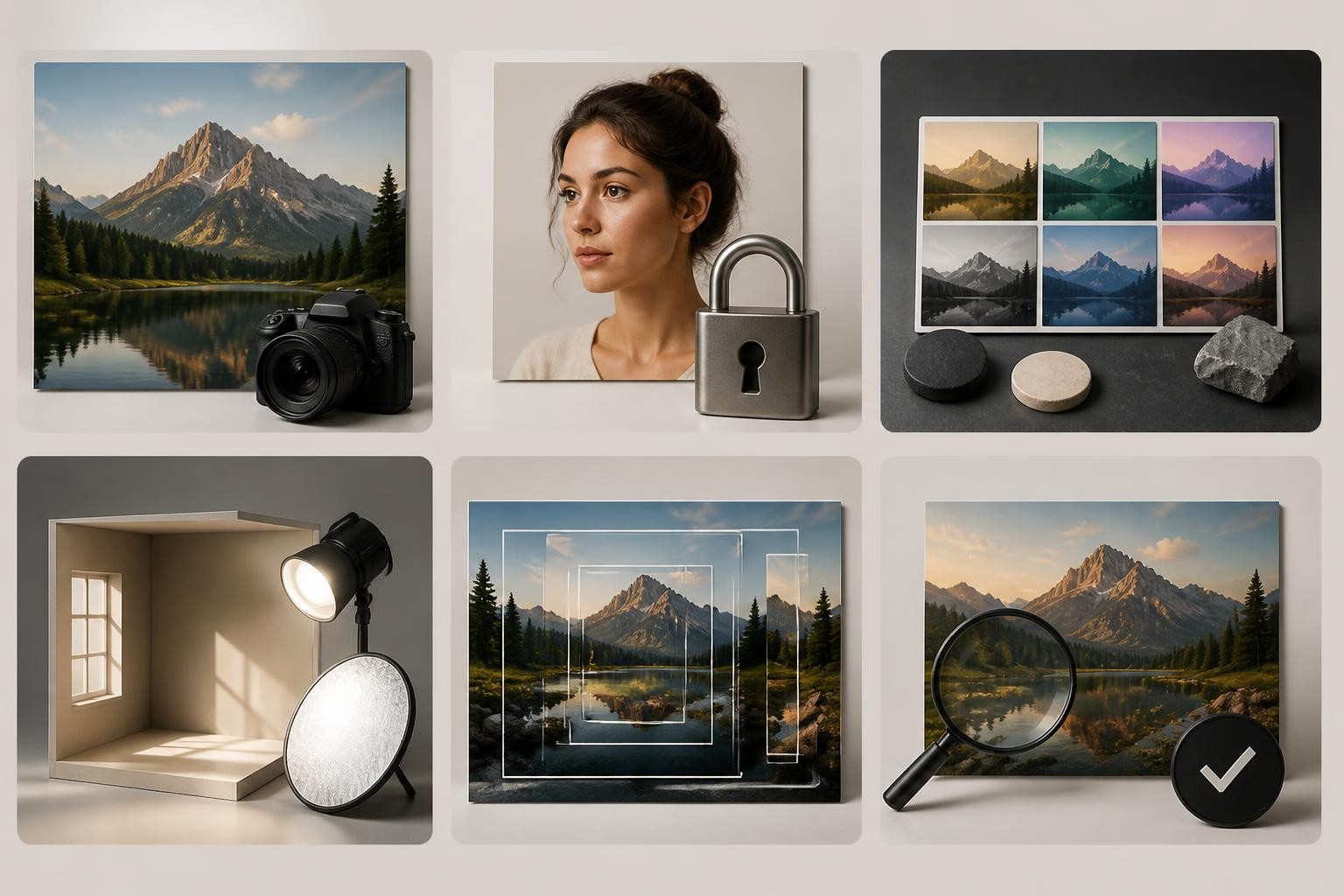
Final checklist before you publish
Use this checklist for any trending ai photo prompt:
- Does the original photo clearly show the subject?
- Did the prompt say what must stay recognizable?
- Is the trend described through visible details, not only mood words?
- Does the composition match the platform format?
- Is there any unwanted text, logo, watermark, or fake label?
- Does the face, body, clothing, and lighting still look believable?
- Would a viewer understand that the image is edited if the context matters?
The goal is not to copy every trending prompt you find. The goal is to understand why the trend works, then translate it into a prompt that protects the subject, fits the platform, and gives the model enough visual evidence to follow.
To test your own prompt variations with an image-to-image workflow, start with a clear portrait and try a structured trending ai photo prompt that separates what should change from what must stay recognizable.
