
krea 2: what it is, what it is good at, and when Img2Img AI is the better next step
krea 2 is Krea AI's in-house image foundation model, announced in May 2026, built around aesthetic range and creative control rather than only prompt obedience. The short version: use krea 2 when you want to explore a visual direction, transfer a style from references, build around a moodboard, or generate expressive image concepts that do not collapse into the same polished AI look. Use an image-to-image workflow such as Img2Img AI when you already have a photo, product image, sketch, or generated draft and need to restyle, enhance, edit, expand, or turn it into controlled variations.
That difference matters because many people searching for krea 2 are not just asking "what model is this?" They are trying to decide whether the krea 2 ai workflow fits a real production job. Krea's own Krea 2 page positions it as an image model built for aesthetics, with style references and moodboards as core controls. Its launch post makes the same point: most image models can understand what you ask for, but Krea 2 is focused on how the result looks.
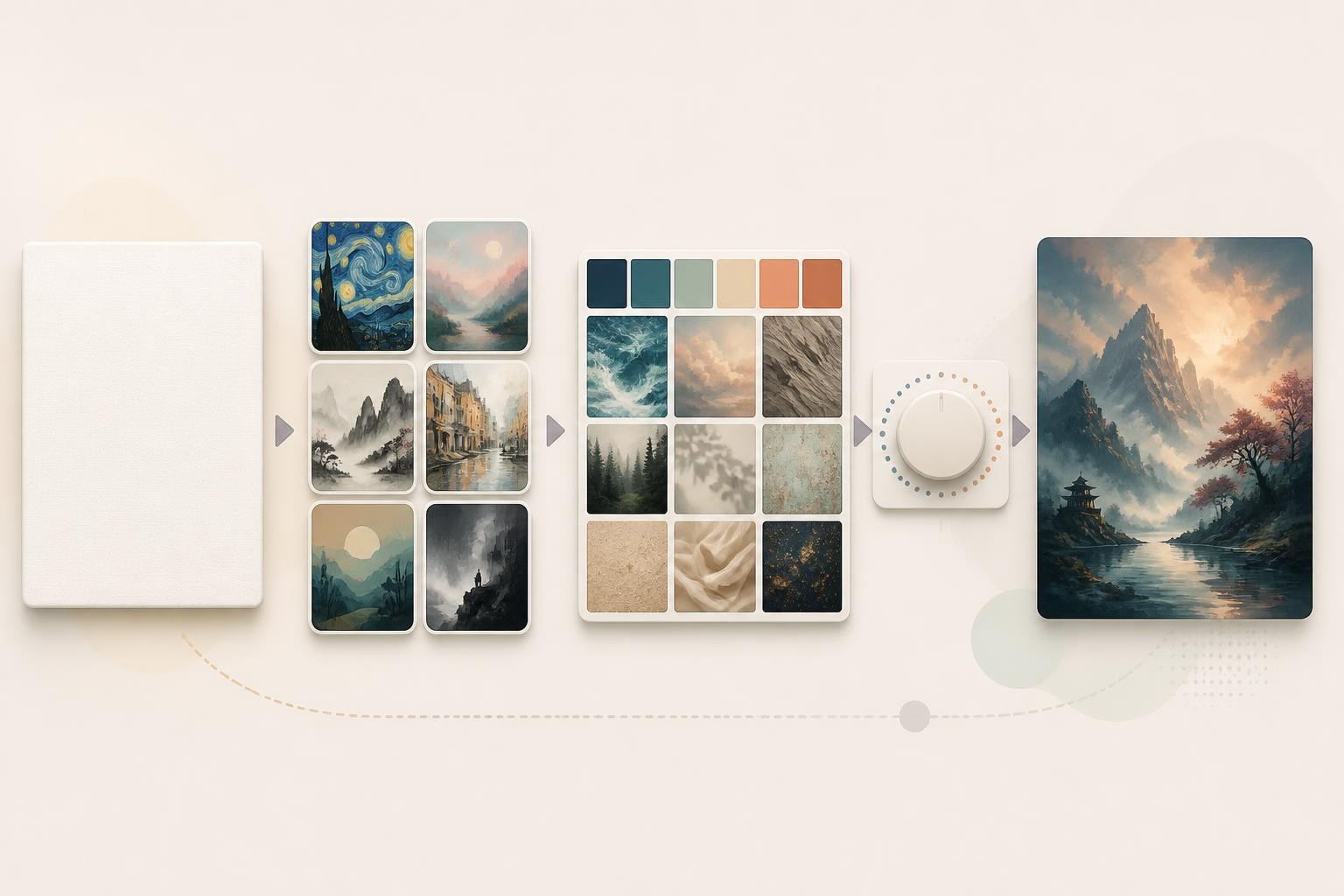
What is krea 2?
krea 2 is Krea's first foundation image model trained from scratch. In practice, that means it is not just another model option inside the Krea interface; it is the model Krea built to support its own creative tools. Krea describes it as focused on aesthetics, style transfer, creative control, and broader visual exploration.
The useful mental model is this:
- The prompt tells the model what should appear.
- Style references tell it what visual language to borrow.
- Moodboards tell it what broader creative world to operate inside.
- Creativity settings decide how much the model can interpret what you left unsaid.
- Medium and Large variants let users trade speed, cost, stability, and raw output character.
Krea's Krea 2 API announcement describes two API variants: Krea 2 Medium and Krea 2 Large. Medium is presented as faster and more cost-efficient, especially for stable expressive work such as illustration, anime, and painting. Large is described as more powerful and more flexible, with stronger potential for photorealism, texture, motion blur, grain, and raw looks. That framing is helpful even if you use Krea in the web app rather than through the API: Medium is the safer iteration model, while Large is the more ambitious final-direction model.
The main krea 2 features
1. Aesthetic diversity
Krea 2's headline strength is range. Krea repeatedly frames the model as a response to the generic "AI look": clean, glossy, safe, and visually similar across prompts. The model is meant to handle expressive illustration, painterly output, cinematic scenes, manga and anime directions, lo-fi textures, graphic styles, and photorealistic work without forcing everything into one polished default.
That does not mean every output will be better than every competing model. It means krea 2 is most interesting when the look is the brief. If your team cares about texture, taste, visual language, and art direction, Krea 2 is built for that lane.
2. Style references with strength control
Style references let you pass one or more images as visual direction. Instead of asking the model to understand a phrase like "editorial cyberpunk watercolor," you can show it a reference and control how strongly the reference influences the output.
Krea's deep dive on style references and moodboards shows the practical value of the strength control. A lower strength can add only a hint of palette or texture. A higher strength can make the reference dominate the final image. This matters because style transfer is rarely binary. A brand may want "slightly informed by this campaign" rather than "make a copy of this exact look."
3. Moodboards for broader visual direction
Moodboards are Krea 2's bigger idea. A single style reference is precise, but a moodboard can represent a wider aesthetic system: color, texture, character attitude, atmosphere, composition habits, recurring motifs, and things to avoid. Krea says moodboards use style transfer plus additional analysis to understand a set of images as a creative direction.
For designers and marketers, this is useful because real art direction often starts from a board, not a prompt. A prompt can describe a frog. A moodboard can say what kind of universe that frog belongs to.
4. Creativity as a controllable parameter
Krea 2 includes a creativity setting in its API. In Krea's terms, low creativity keeps the generation closer to the prompt, medium balances interpretation and control, high allows more visual invention, and raw avoids expansion beyond what is explicitly described.
This is an underrated feature because vague prompts are not always a mistake. Early concept work often begins with a loose direction. A model that can interpret missing details can be valuable during exploration. Later, when you need consistency, you can tighten the prompt, lower creativity, or move into references and moodboards.
5. API access and workflow integration
Krea 2 is available through Krea's API with endpoints for Medium and Large variants. The API supports prompt, aspect ratio, seed, creativity, style references, and moodboards. Krea also notes access through partners and workflows such as Fal, Comfy, and Runware.
This makes krea 2 relevant beyond casual generation. A studio can use it inside a creative pipeline, a product team can build internal concepting tools, and a developer can create a style-driven generation workflow without relying only on manual web app sessions.
What krea 2 is best for
krea 2 is strongest when you need to search through visual directions, not simply produce the most literal image from a long prompt. Good use cases include:
- Brand mood exploration
- Campaign concept art
- Editorial images
- Illustration systems
- Anime, manga, and painterly styles
- Product concept directions before final photography
- Game, architecture, fashion, and entertainment references
- Style transfer where the reference image is the real creative brief
The best workflow is not "write one perfect prompt." It is closer to art direction:
- Start broad with a short prompt.
- Generate multiple directions.
- Pick one visual lane.
- Add style references.
- Build or choose a moodboard.
- Adjust creativity and reference strength.
- Move promising results into editing, enhancement, or image-to-image variation.
That last step is where an alternative can make more sense.
Where krea 2 may not be the best fit
Krea 2 is powerful, but it is not the right answer for every image task.
If your job starts from an existing image, you may not need a style-first foundation model. You may need a practical image-to-image editor. For example, if you have a product photo and need a cleaner background, a portrait that needs restyling, an old image that needs restoration, or a social asset that needs quick variations, the core task is preservation plus controlled change.
That is a different workflow from open-ended generation. You are not asking, "What could this idea become?" You are asking, "How can I keep the useful parts of this image while changing the look, quality, or setting?"
Krea itself has image tools and editing features, and its image generation documentation explains that model settings vary across aspect ratios, image prompts, styles, and references. But for many everyday creators, the simpler question is whether they need a style lab or an image-to-image workstation.
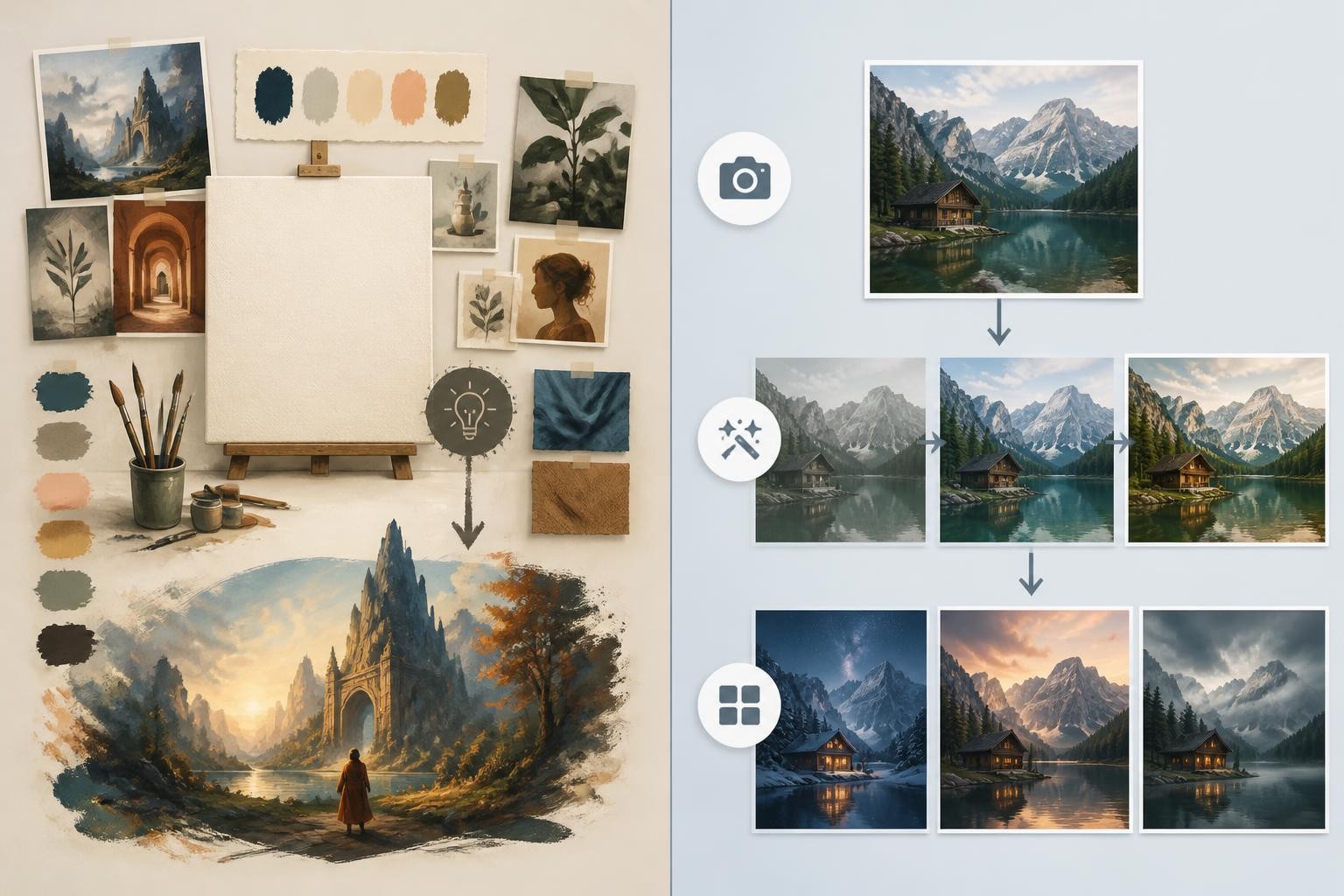
Img2Img AI as a krea 2 alternative
Img2Img AI is a practical alternative when the main task is transforming an existing image. Its homepage presents it as an all-in-one image-to-image AI workspace that supports text-to-image and image-to-image creation, reference image uploads, restyling, enhancement, background processing, outpainting, and quick effects.
The simplest distinction is:
- Choose krea 2 when style exploration is the main job.
- Choose Img2Img AI when an existing image is the anchor.
That makes Img2Img AI especially useful for creators who do not want to manage many separate tools. Instead of moving between a generator, background remover, enhancer, restoration tool, and effect app, the value proposition is a single workspace for common image-to-image jobs.
When Img2Img AI is the better choice
Use Img2Img AI when you need:
- Photo restyling while keeping the original subject and framing
- Product image variations without rebuilding the whole scene
- Background removal, replacement, or cleanup
- Old photo restoration or image enhancement
- Outpainting for new aspect ratios
- Quick social effects and filters
- A lower-friction workflow for non-designers
This is not a claim that Img2Img AI replaces Krea 2 for deep style research. It is a narrower recommendation: if your work begins with an input image and the output must preserve some of that image, an image-to-image tool is often the more direct route.
krea 2 vs Img2Img AI: how to choose
Choose krea 2 if the question is style
If your brief sounds like "find the look," "match this aesthetic," "build a campaign direction," "explore a visual universe," or "use this moodboard as creative DNA," krea 2 is the stronger starting point. Its style references, moodboards, creativity controls, and Medium/Large variants are built for that kind of exploration.
Krea 2 also has meaningful evidence behind its style focus. Krea published a note on a Contra Labs evaluation where Krea 2 Large performed strongly on style fidelity, especially when the task was preserving the visual language of a reference image. Treat that as one signal, not a universal ranking. Benchmarks reward the exact thing they measure, and style fidelity is not the same as being the best tool for every image.
Choose Img2Img AI if the question is controlled transformation
If your brief sounds like "keep this person but change the background," "turn this product shot into campaign variations," "make this photo cleaner," "extend the frame," or "create versions from this image," Img2Img AI is likely the more efficient option.
The reason is workflow gravity. A dedicated image-to-image tool starts from the source image as the foundation. The prompt becomes an instruction for change, not the entire creative source. That is the right posture for many real marketing, ecommerce, creator, and design tasks.
Use both if you move from concept to asset
The strongest workflow may use both:
- Use krea 2 to explore the visual direction.
- Save the strongest generation as a reference or draft.
- Use Img2Img AI to restyle, clean up, enhance, expand, or create production variations.
That sequence keeps Krea 2 in its best role as an aesthetic exploration model, while Img2Img AI handles the more practical image transformation stage.
A practical prompt framework for krea 2
If you are trying krea 2 for the first time, do not overpack the prompt. Start with a small brief and let the model show you directions.
Use this structure:
- Subject: what should appear
- Use case: why the image exists
- Visual lane: broad style, medium, or mood
- Constraints: what to avoid
- References: style image or moodboard when the look matters
- Creativity: high for exploration, low for tighter control, raw for literal prompts
Example:
"A campaign image for a compact ceramic desk lamp on a quiet studio table, soft morning light, restrained editorial product photography, subtle texture, no logos, no readable text, no extra products."
For style exploration, keep the prompt shorter and use references. For controlled output, add constraints and lower creativity. For brand work, build a moodboard instead of asking the prompt to carry the entire visual identity.
A practical prompt framework for Img2Img AI
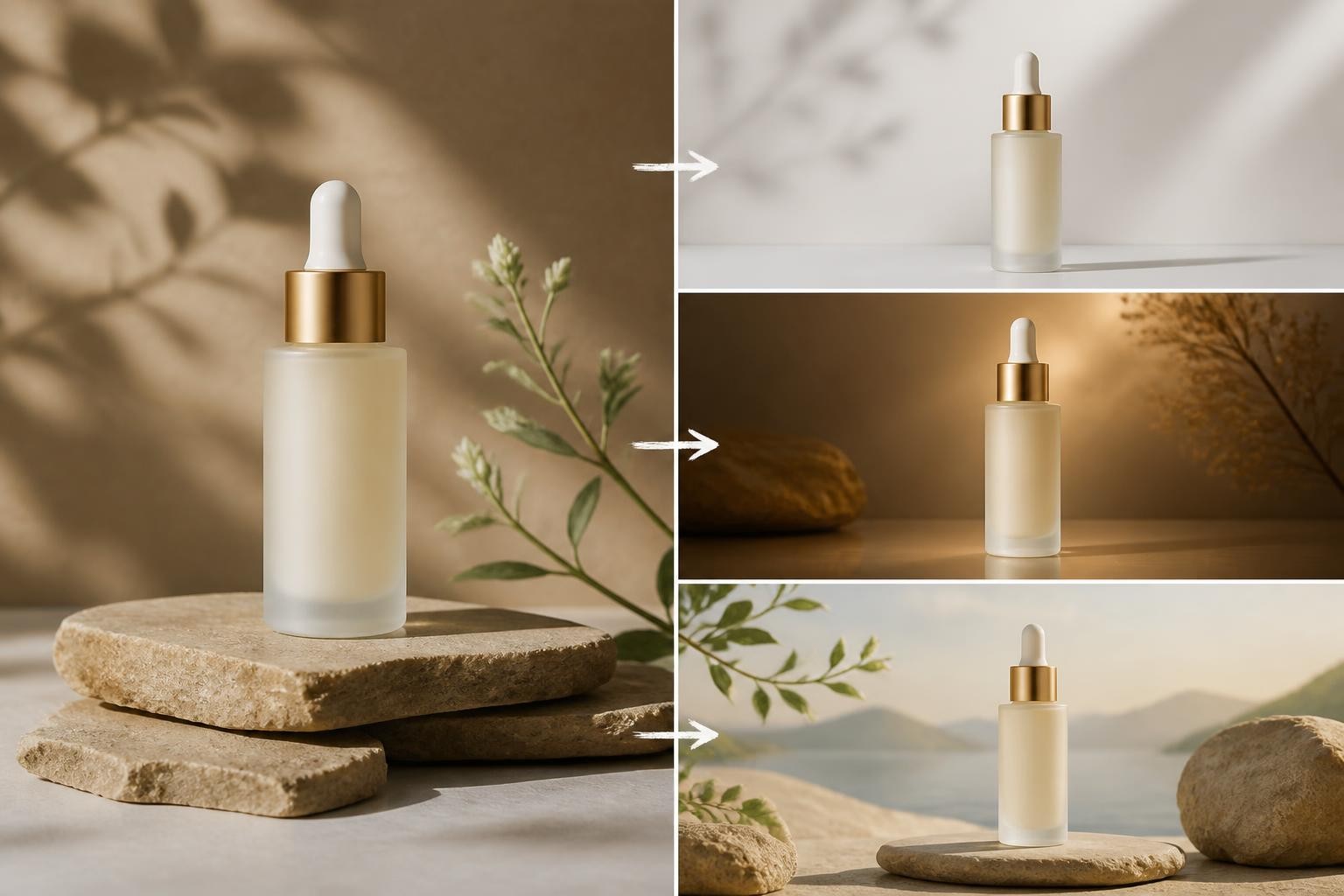
Image-to-image prompting works better when you separate what changes from what stays fixed.
Use this structure:
- Source image role: what the uploaded image provides
- Preserve: subject, pose, camera angle, identity, product shape, lighting, or composition
- Change: style, background, color, mood, surface, effect, or format
- Quality check: what makes the edit look natural
- Output need: aspect ratio, realism level, or use case
Example:
"Use the uploaded product photo as the source. Preserve the product shape, camera angle, proportions, and main shadow. Replace the background with a softly lit kitchen counter scene. Make the result look like one natural photograph, with matching light direction and no readable text."
This kind of prompt is usually better than "make this look premium" because it protects the parts of the image that already work.
Common mistakes to avoid
Treating krea 2 like a normal prompt box
The model's value is not only in text prompting. If you ignore references, moodboards, and creativity settings, you are missing the controls that make krea 2 different.
Using moodboards too late
If a project depends on a consistent visual language, build the moodboard early. Otherwise you may spend too long trying to describe taste in words.
Using image-to-image without preservation rules
When editing an existing image, always say what must stay fixed. Otherwise the model may reinterpret the entire scene.
Choosing a tool before naming the job
"Best AI image generator" is too broad. The real question is whether you need exploration, style fidelity, image editing, enhancement, restoration, background work, or fast variations from a source image.
FAQ
Is krea 2 the same as Krea AI?
No. Krea AI is the creative platform. krea 2 is Krea's own image foundation model inside that broader platform and API ecosystem.
Is krea 2 good for beginners?
Yes, if beginners treat it as a visual exploration tool rather than a prompt memorization challenge. Start with short prompts, then add references and moodboards once you know the direction you want.
Is krea 2 better than Img2Img AI?
They solve different jobs. krea 2 is better for style-led concept generation and aesthetic exploration. Img2Img AI is better when you already have an image and want to transform it through editing, restyling, enhancement, or controlled variations.
Can Img2Img AI replace krea 2?
It can replace krea 2 for many practical image-to-image tasks, but not for every style research workflow. If your goal is to discover a visual identity from references and moodboards, Krea 2 is more specialized. If your goal is to turn a source image into polished variations, Img2Img AI is often more direct.
What is the best next step after learning about krea 2?
Name your image job first. If you need aesthetic exploration, try Krea 2 with a moodboard or style reference. If you need to edit, restyle, enhance, or expand an existing image, use an image-to-image tool and write clear preserve/change instructions.
Try an image-to-image alternative
If your interest in krea 2 is really about turning existing images into cleaner, more controlled versions, try Img2Img AI as the next step. Upload a source image, describe what should change, protect what should stay the same, and generate a practical variation you can refine.